
Multizone | All our technotes
If we've published it, you can find it here.

Symbian
Symbian was the most popular Smarphone OS in the world before Android and iOS. I product managed the first test successful automation suite for Symbian devices, which was sold to Nokia, Sony Ericsson, Vodafone and others network operators before being acquired (multiple times).
I was fond of Symbian and its unique devices and came across some screenshots and notes and thought I'd just collect them here.
TL:DR – These screenshots and pages are all about Symbian devices which are obsolete now.
- Details

When Apple announced its transition to Apple Silicon at WWDC20 in June 2020, the scale of what was coming was still largely theoretical. Six years on, the story is complete — and it is one of the most successful platform transitions in computing history. The original article below has been updated throughout, but this section addresses the headline question: how much of what was predicted came true?
Almost all of it. The first Apple Silicon Macs — the M1 MacBook Air, MacBook Pro, and Mac mini — shipped in November 2020, exactly as Apple promised. The performance gains were not incremental; they were generational. Battery life on the MacBook Air more than doubled compared to its Intel predecessor. Rosetta 2 worked so transparently that many users ran Intel apps for months without noticing. By 2022, Apple had completed the transition across the entire Mac lineup, retiring Intel far faster than most analysts expected. The last Intel Mac — the Mac Pro — was replaced by an Apple Silicon version in 2023.
The chip roadmap has since moved through M1, M2, M3, and M4 generations, with Pro, Max, and Ultra variants pushing into workstation and server territory that was once the exclusive domain of Intel Xeon and AMD Epyc processors. The prediction that buying a late-Intel Mac would be a mistake aged extremely well — those machines lost software support and resale value quickly.
The one prediction that did not land was the suggestion that a translucent menu bar might signal a coming touchscreen Mac. As of 2026, macOS still does not ship on a touchscreen device, though Apple's Vision Pro has introduced spatial computing interactions that blur that boundary in a different direction entirely.
TL:DR – Originally published on LinkedIn following WWDC20. This version has been substantially updated in 2026 to reflect how Apple Silicon's story actually played out — and to assess which predictions hit the mark.
- Details

Looking back: Hancock's Half Hour and the COVID app fiasco
Five years on from the UK government's spectacular mishandling of its COVID-19 contact-tracing app, the episode stands as one of the most instructive — and avoidable — technology policy failures in recent British history. What was already apparent in real time has since been confirmed in exhaustive detail: the government wasted months, burned through public money, and repeatedly blamed Apple and Google rather than confront its own strategic errors.
TL:DR – The short version? Never pick a public fight with Apple. It never goes well. These are Apple-manufactured devices, it is Apple's App Store, and if Apple decides you are not in compliance, they will show you the door — politely, but firmly, and with the receipts.
- Details
Statista piblished a chart of the highest valued startups in the world. What is interesting to see is the U.S. only making up 40% of the top ten. Times are changing even in the current uncertainty. 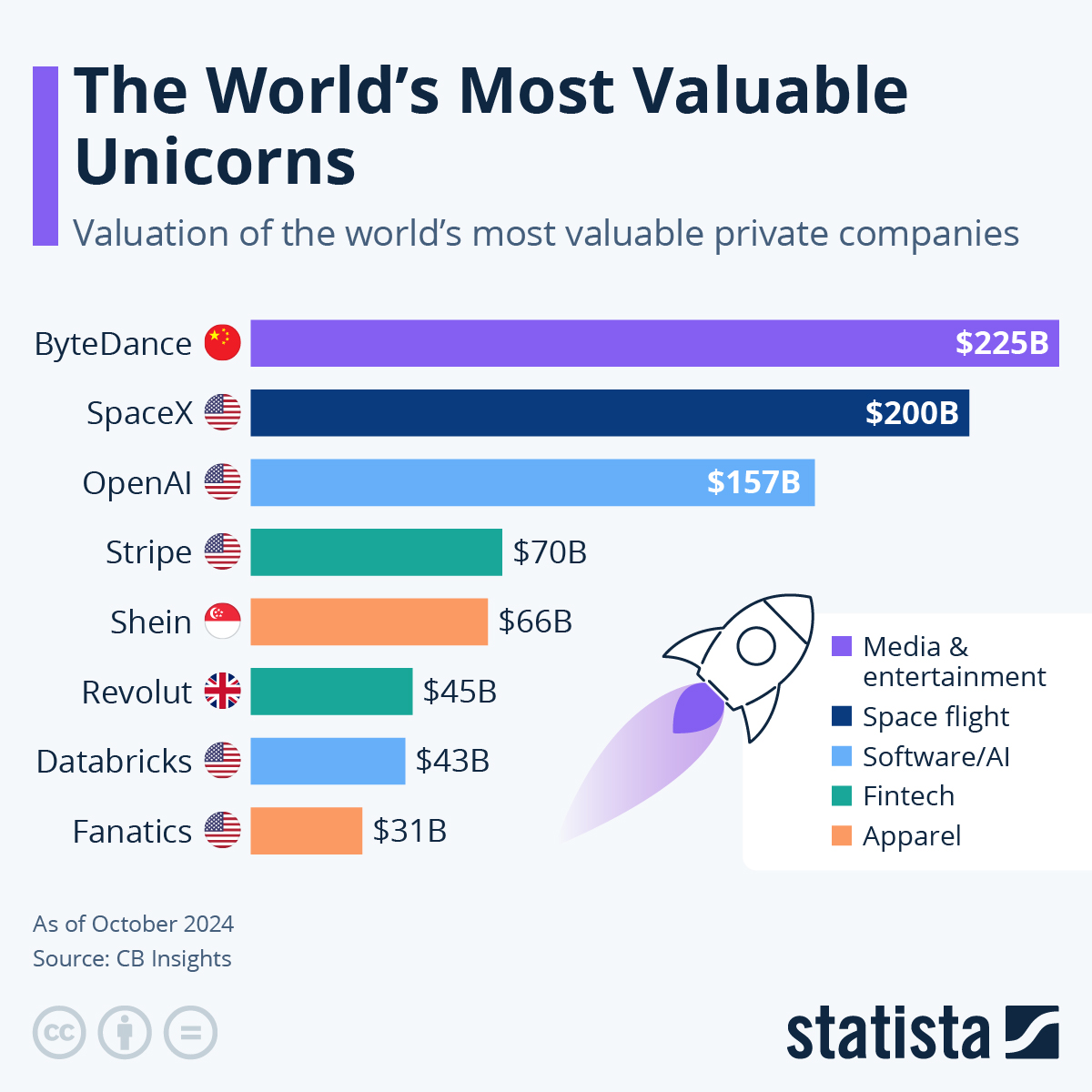 You will find more infographics at Statista
- Details

Back in April 2020 I picked up an iPhone SE (2nd generation) for iOS development and demo use on a side project. Now, in 2026, that same phone is still in daily use on my desk — running iOS 26, paired with Xcode, and holding its own against devices released years after it. The SE (2nd gen) was discontinued in March 2022, but discontinuation doesn't mean obsolete: Apple continues to support it with the latest software, and the used market has made it genuinely affordable. If you're looking for a capable, low-cost iOS development device in 2026, this remains one of the smartest buys available.
TL;DR – The iPhone SE (2nd generation) is compatible with iOS 26 and remains an excellent device for development and testing. As of early 2026 you can find them on Amazon Renewed for around £75 — which, given iOS 26 compatibility, is a remarkable amount of phone for the money.
{ToC}
2026 update: still supported, still relevant
The headline news for 2026 is straightforward: iOS 26 supports the iPhone SE (2nd generation). Apple's official compatibility list confirms it sits alongside the iPhone 11, iPhone SE (3rd generation), and the entire iPhone 17 line — including the new iPhone Air and iPhone 17e — as a supported device. That is a remarkable lifespan for a phone released in 2020 and discontinued in 2022.
For developers, this matters enormously. A device running the current shipping OS is a device you can use to test production builds, reproduce user-reported bugs, and demonstrate apps to clients. The SE (2nd gen) covers a real segment of the installed base: users who hold on to older hardware longer than the upgrade cycle suggests they should. Testing on this device keeps you honest about performance on modest hardware.
The wider iPhone 17 family — iPhone 17, iPhone 17 Pro, iPhone 17 Pro Max, iPhone Air, and iPhone 17e — also runs iOS 26, so if you're building for the latest hardware too, the SE (2nd gen) gives you a useful lower-bound comparison point in your device matrix.
Specifications at a glance
The SE (2nd gen) shares its processor with the iPhone 11 Pro. That was a bold claim in 2020 and it still holds up as a statement about the device's capability ceiling.
| iPhone SE (2nd generation) | iPhone 11 Pro | |
|---|---|---|
| Processor | Apple A13 Bionic | |
| Speed | 2.66GHz | |
| Architecture | 64-bit ARMv8.4-A | |
| CPU Cores | 6-core (2 performance + 4 efficiency) | |
| Neural Engine | 8-core | |
| Built-in Memory | 3GB | 4GB |
| Graphics | Apple-designed 4-core GPU | |
| Display | 4.7-inch Retina HD LCD, 1334×750, 326 ppi, True Tone, P3 wide colour | 5.8-inch Super Retina XDR OLED |
| Rear Camera | 12MP Wide, f/1.8, OIS, Portrait mode | Triple 12MP system |
| Water Resistance | IP67 (1 metre, up to 30 minutes) | |
| Connectivity | Wi-Fi 6 (802.11ax), Bluetooth 5.0, NFC, Gigabit LTE | Wi-Fi 6, Bluetooth 5.0, NFC |
| Dimensions | 67.3 × 138.4 × 7.3 mm, 148g | 71.4 × 144.0 × 8.1 mm, 188g |
Source: Wikipedia / Apple support specifications
Worth noting: Wi-Fi 6 support was not a given on a device at this price point in 2020, and it remains a useful capability in 2026 — fast enough to pull large Xcode builds and simulator runtimes without frustration.
Press release image

Source: Apple Newsroom, for personal or editorial use
Unboxing
This is the original retail version of the iPhone SE (2nd generation), which shipped with a power adapter and EarPods — both of which Apple removed from the box in subsequent iPhone releases. If you're buying refurbished today, expect a generic or third-party charger and cable rather than original Apple accessories.


Source: ezone.co.uk
Where to buy in the UK
Around £95 buys you an iOS 26-capable iPhone on the Amazon UK Renewed marketplace in early 2026. Amazon Renewed devices are professionally inspected, tested, and cleaned by Amazon-qualified vendors. They are not Apple-certified refurbished units, but they come with a one-year Amazon Renewed Guarantee. Condition is graded "Excellent" — no visible cosmetic damage from 30 centimetres — and battery capacity is guaranteed above 80% relative to new. Accessories may not be original Apple parts but will be compatible and fully functional. The device may arrive in a generic box.
At this price, the value proposition is hard to argue with. A brand-new entry-level iPhone — the iPhone 16e — retails for considerably more. For a dedicated development and testing device that you intend to leave plugged into your Mac, spending a fraction of that on an SE (2nd gen) is a rational choice.
Protect your device
A clear case is the obvious choice — it shows off the (PRODUCT)RED finish while providing meaningful drop protection. Pair it with a tempered glass screen protector to guard against scratches. Neither will cost much, and both are worth it on a device you'll handle regularly in a development environment.
Developer setup
Getting the SE (2nd gen) set up as a development device is straightforward. Transfer your accounts and settings from an existing iOS device using Apple's own guide: Set up your iPhone, iPad, or iPod touch.
Once that's done, connect the phone to your Mac. Xcode will detect it and walk you through the steps to configure it for development. A couple of settings are worth adjusting immediately:
- Go to Settings → Display & Brightness → Auto-Lock and set it to Never. This prevents the device locking mid-build and interrupting your deploy cycle.
- Use automatic signing in your Xcode project. It handles provisioning profiles behind the scenes and removes most of the friction from device registration.
The first time you deploy a build, Xcode will prompt you to register the device with your Apple Developer account. Follow the prompt and it's done. After that, the device behaves exactly like any other in your fleet.

Source: ezone.co.uk
First impressions (2020, still holds)
iPhone SE is for people who want a full-powered iPhone experience, including the best single-camera system on any smartphone, in a compact design at an affordable price.
That quote from the original launch holds up. Out of the box this phone felt fast and well-made — aerospace-grade aluminium frame, durable glass front and back, a quality build that belies the price. The 4.7-inch Retina HD display is sharp at 326 ppi, with True Tone and P3 wide colour coverage that makes it genuinely pleasant to look at. The all-black front gives it a clean, focused appearance.
Coming from an iPhone X or 11 Pro, relearning the Home button takes a day or two. After that it becomes second nature. Haptic Touch replaces 3D Touch without any real loss in day-to-day use.
One thing that surprised me at the time: wireless charging. For a device positioned as the affordable option, support for Qi wireless charging and fast charging (up to 50% in around 30 minutes) felt like a bonus rather than a given.
Long-term view: six years in
This phone has now been in continuous use for six years. It runs iOS 26. It is fast, reliable, and has never given me cause for concern as a development device. The black bezels and physical Home button are the only visual reminders that the underlying design dates from 2017 — everything else about using it feels current.
Battery life remains solid, even accounting for the age of the cell. I leave it plugged into my Mac for extended periods during active development, which has probably helped. For a device that spends most of its life tethered to Xcode, this is the right trade-off.
The 3GB of RAM is the one area where you'll occasionally notice the hardware ceiling — complex apps with large memory footprints may behave differently here than on a 6GB or 8GB device. That's actually useful information for a developer: it surfaces memory pressure issues that you might not catch on newer hardware.
If you're building for the broad iOS installed base and want a reliable, affordable secondary device that runs the current OS and connects cleanly to Xcode, the iPhone SE (2nd generation) in 2026 remains exactly what it was in 2020: the smartest value in Apple's ecosystem. Get one.
- Details

Chromebooks have matured enormously as developer machines — but 2026 marks a genuine turning point. Google has announced a brand-new category of premium Android-based laptops called Googlebooks, due to arrive in autumn 2026, built on the Android technology stack and deeply integrated with Gemini AI. At the same time, the classic Chromebook line continues, with all devices released in 2021 and beyond now guaranteed 10 years of automatic software updates. If you are evaluating a laptop for Android development today, the landscape looks quite different from even a couple of years ago — and this article will help you navigate it.
TL:DR – The core developer appeal of ChromeOS remains the same: you can build an Android app in Android Studio running under Linux, then sideload and test it directly on the same device as a native Android app — no emulator, no second device needed. That workflow is still one of the most underrated advantages of developing on ChromeOS hardware. But the hardware choices, the software support windows, and the strategic direction from Google have all shifted significantly.
- Details

Thank You for the Music, iTunes — A 2026 Update
This article started life as a post about finally giving up on iTunes and Apple Music in favour of Plexamp. That journey is still worth telling, but enough has changed since then to warrant a proper revisit.
TL:DR – The short version: Plexamp served me well for a while, but I have since moved on again — this time to AIMP on Android. The longer version is below.
- Details
