

Building for One, Part one: a calm iPad display for someone living with dementia built a calm daily tablet display for someone in the early stages of dementia. Building for One, Part thirteen: the rejection that made it better told how Apple’s first two rejections gave the app a welcome page, accounts from the tablet and better settings. This last part is about the two rejections that followed, and the email at the end of them.
On 19 October, App Store Connect sent the email every developer waits for: “The following app is ready for distribution.” Daysome 0.6.3, with its household plan, is approved for the App Store. It took four rejections in ten days, and we’d like to mark it, because a lot of small things had to go right to get there, and every one of them made the app better.
TL;DR – Apple were right every time they turned Daysome down, and each rejection left the app more complete than it found it. Patience and politeness got it through, as they always have.
Contents
Four rejections in ten days
Part thirteen covered the first two. On 9 October a reviewer said the app had launched on a frozen screen. It hadn’t, but a family installing it would have met the same calm, untouchable screen, so it now opens on a welcome page until somebody sets it up. On 15 October the purchases’ promotional pictures were turned down for being the same as the app’s icon, which they were. We deleted them.
The next two were both under guideline 2.1(b), Information Needed, and both said the same thing: the reviewer couldn’t find the in-app purchases. Both times, they had a point.
“We cannot locate the In-App Purchases”
The first came on the evening of 15 October. The reviewer had started, and couldn’t go on, because the yearly plan and the one-time purchase were nowhere to be found in the app.
They were right, and the cause was ours. Daysome sells its plan to a household, so the purchases appear once a tablet is connected to one, and they give way to the plan once it’s paid for. The review household had been left paid for after our own testing. A reviewer who connected to it found a household that had nothing left to buy. Part thirteen had even warned that the review household would need putting back on its trial before every submission. We hadn’t made that something you could check.
We replied the same evening with the steps, put the household back on its trial, and then spent two days making sure it couldn’t happen again. All of it went into AppSync, the Joomla extension that runs Daysome’s households, and none of it mentions Daysome, so any app built on it gets the same help with its own reviewers:
- Reset to trial. One button in the site’s admin puts a household back on a fresh trial, and logs what it had before.
- A household for each purchase. Buying either purchase hides the other, so a reviewer can only ever try one per household. There are now two review households, one for the yearly plan and one for the one-time purchase.
- A readiness check. The admin now says whether each household kept for a reviewer is how it should be: on its trial, with nothing renewing for it, device places free, and the App Review account a member. A script asks the same question before every submission. It caught us once, with a subscription due to renew into a review household at five to two that afternoon.
- Test renewals leave a trial alone. TestFlight renews a subscription every day, whatever its length. A household put back on its trial turned paid again at the next renewal of our own test purchase, and nobody can cancel a reviewer’s test subscription for them. No money changes hands in Apple’s test environment, so those renewals are now noted and ignored. A new test purchase still counts, which is what the next reviewer needs.
“Unresolved issues”
On 18 October it came back again, with a request: provide a way to reach the purchases, “such as a demo account information with an existing household.” We’d been careful never to use the word demo in our own notes, because our experience is that it counts against you for app completeness. Apple used it themselves. We carried on calling it the App Review account.
What had happened was that the reviewer followed our steps as far as “Add this device to an existing Daysome household” and stopped there. That step asked them to show a code on the iPad, open daysome.org, sign in with the App Review account, find the right household, type the code, and come back to the iPad. As far as we could tell, the account was never signed in during the review, and both households still had every device place free.
All those steps are a lot to ask of somebody with a queue of apps to review and a few minutes for each, and they were right to say so. It’s also a lot to ask of a family. A son adding a second tablet for his mum’s kitchen has the same two-device dance to do, and the same chance of giving up halfway.
Household codes
So we took the website out of it. In AppSync 0.1.31 a household can have a code, and a tablet that types it joins the household straight away, with nobody signing in anywhere. The household’s plan and device places still apply. Capitals, spaces and dashes don’t matter, and five wrong codes end the attempt, so guessing gets nowhere. A household’s owner makes the code on its Devices page at daysome.org, and can replace it or turn it off.
In Daysome 0.6.3, “Have a household code? Enter it here.” is the first thing in the card for adding a device to a household, on the welcome page and in the Household settings. The route with an account stays underneath it for anybody who prefers it. The reviewer’s route became one step: type the code on the welcome page, tap Connect, and the page says “Connected to Review Household, yearly”, on its trial, with both purchases underneath. We tested that end to end on a simulator against our test server before tagging the release. Each review household’s code went in the review notes, and nowhere else.
A code joins a display, and that’s all. A household code can’t sign in to the website or change anything a member can. That’s the right amount of power for a tablet on a kitchen wall. Next, every new household will get a code when it’s created, and a person will be able to make a code of their own, so a device can be tied to them and join any of their households. Apple’s rejection is what got us there.
Testing it the way a reviewer would
Before submitting, we went through the whole route on a real iPad with the TestFlight build. It found two more things.
“This purchase belongs to another household.” Our own Apple ID had bought the one-time purchase earlier on, while connected to a different household. A one-time purchase can be bought once per Apple ID, ever, and a TestFlight build uses your own Apple ID, so there’s no clearing it. We had also told RevenueCat, which sits between the stores and our server, to keep a purchase with the household it was bought for, rather than move it to whichever household restores it. So the app was right to refuse, and a reviewer with their own test account would never see it. It just meant we couldn’t demonstrate that purchase ourselves.
The yearly plan bought, and the household still on its trial. This one was our own rule from two days earlier. When a subscription has run out and the same Apple ID buys it again, Apple keeps the original transaction, so the purchase arrives as a renewal. Our new rule ignored test renewals on a household on its trial, and swallowed it. AppSync 0.1.32 now compares when it was bought with when it last ran out: bought after that, it’s a new purchase and counts. It was found, fixed, tested and released the same morning. Every rule we’d written to protect a reviewer had an edge that only showed up when we went through it as one.
A video, for good measure. We recorded the route on the iPad, from the welcome page to Apple’s own purchase sheet, and attached it to the submission. Then the readiness check said both households were ready, and we pressed Submit.
This time, Daysome was approved in just a couple of hours.
The complexity, and why it’s there
Getting an app with in-app purchases through review means holding a lot in your head at once. There’s the version and the build, and both purchases have to be gathered into the same submission from different pages. The review notes, and each purchase’s notes, are separate boxes with their own limits. The video goes in an attachment field and the replies go in the Resolution Center. Then there are three kinds of purchase: real ones, test ones, and TestFlight’s, which use your real Apple ID and renew every day. And RevenueCat sits between all of it and our own server, with settings of its own.
It’s a lot, and we still think App Store Connect could do more to help, as part thirteen said. But almost every rule that cost us a day protects somebody. Purchases a reviewer can reach are purchases a customer can find before paying. A test environment lets reviewers buy without spending money. A one-time purchase that can only be bought once means nobody pays twice, and a product identifier that can never be reused means an old receipt never turns into something else. Once you see who each rule is for, it’s much easier to work with it rather than against it.
Patience and politeness
We’ve been taking apps through App Review for more than ten years, and in all that time no app of ours has ultimately been refused. Some have taken several rounds, like this one. None of them got through by arguing.
A reviewer is a person working through a queue, who has never seen your app, has a few minutes for it, and won’t read a long note twice. Every reply we sent thanked them, said what we’d changed, and gave steps that would work for somebody seeing the app for the first time. When they were wrong about the cause, as with the frozen screen, they were right about what it felt like, and that was the part worth listening to. We think arguing would have got a quicker reply and a worse app.
Sometimes this back and forth is just necessary. Reviewers and developers both want good apps on the store, and each can see something the other can’t. We know what the app is for. They know what it’s like to arrive at it cold, which is what every new family does.
What Daysome got out of it
| When | What the reviewer said | Were they right? | What it gave Daysome |
|---|---|---|---|
| 9 October | The app launched on a frozen screen | About how it felt, yes | A welcome page, accounts from the tablet, and regrouped settings |
| 15 October | The purchases’ pictures are the same as the icon | Yes | Accurate store pages, and a plan for promoting the purchases properly |
| 15 October | We can’t find the purchases | Yes: the review household was paid for | Reset to trial, a household for each purchase, a readiness check, and test renewals handled properly |
| 18 October | We still can’t: give us an existing household | Yes: the way in left the app | Household codes, typed on the tablet, with person codes to follow |
That’s four rejections and four improvements. Not one of them was a feature for App Review alone. Each one is something a family setting up a tablet will be glad of without ever knowing why it’s there.
The end of the series
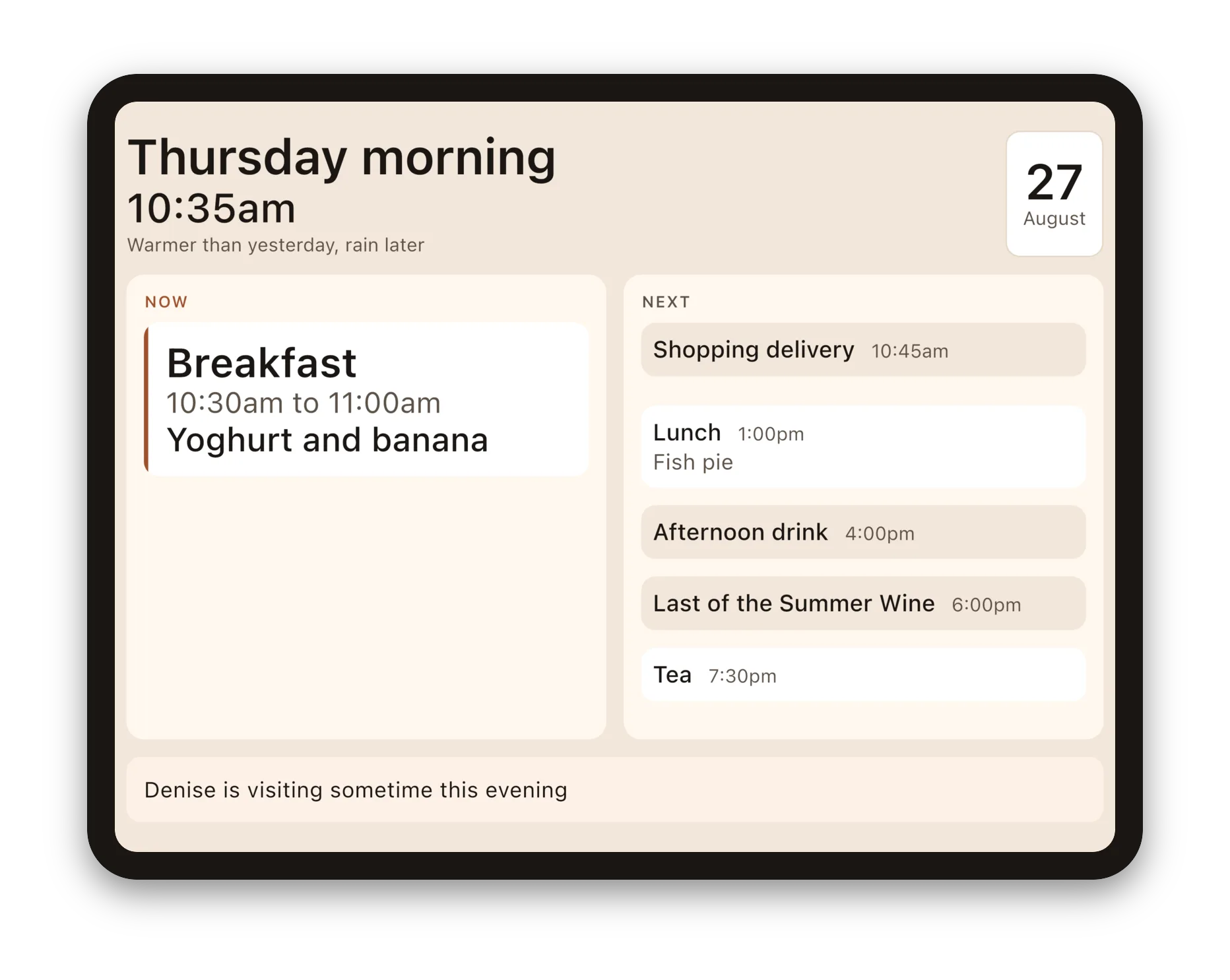
Building for One started with a calm screen for one person, showing her day so she didn’t have to keep asking. Fourteen parts later that screen is on three app stores, with a website the family uses, a household plan on every store, and a welcome page that teaches its own way in. The display in the picture above hasn’t changed much along the way, and it shouldn’t have. Everything else was built so that it could stay that simple.
This is the last part of the series. Daysome carries on, and what changes from here will be at daysome.org. Thank you to everybody who has read along, tested a build, or told us plainly where we’d got it wrong. And thank you, too, to the reviewers at Apple, who made the app better four times in ten days.
Getting it, and telling us where we went wrong
Daysome is on all three stores: the App Store, Google Play, and the Amazon Appstore, with links to each at daysome.org. The app is free, and with 0.6.3 the household plan is on all three, starting with a free trial.
We would like to hear from you, and that matters to us more than an install does. If you support someone in the early stages of dementia who is still living independently, or you work in dementia care and would be willing to tell us plainly where we have got it wrong, that is the thing we cannot get any other way. If you would try a test build, say so at daysome.org/testers.html.
Plainly, so nobody is misled: Daysome is an app centred on a display that shows the day. It is not a medical device, not a monitoring system, and not a substitute for anybody. It does not track whether medication has been taken, and it never will.
