

Building for One, Part one: a calm iPad display for someone living with dementia built a calm daily tablet display for someone in the early stages of dementia, and Building for One, Part eight: why Daysome is not peer to peer argued that the first thing it could not do, being edited from a phone that is not in the house, needed a server rather than two devices talking to each other. This part is what happened when we built it, and the decision that came out of the other end: what stays free, what is paid for, and how a family pays.
It was a week. Most of it was not spent on the thing the family will notice.
TL;DR – The tablet stays free and complete. What a family pays for is the household: the same day on the website, on more than one tablet, for more than one person. The tablet shows a code, the website claims it, and the server holds the plan so that any tablet in the house unlocks together.
Contents
What got built, and why it does not know what a meal is
The server side is a Joomla extension, and the first decision about it was that it must not be a Daysome extension. We will be building other apps, and the argument that made the Flutter chassis worth extracting applies just as well here: the cost of the next app’s backend should be close to nothing. So the extension knows about apps, groups, members, devices, and items, and nothing else. A household is a group. A carer is a member. The iPad is a device. Tonight’s tea is an item of a type the app declares.
That declaration is the part we think is worth stealing. Each registered app carries a schema: its item types, their fields, and what kind of thing each field is, from a short list of kinds the server understands. Text, a choice, a time, a date, a month and day, a set of weekdays, a reference to another item. The server validates every write against it and, more usefully, generates the website’s pages from it. Daysome’s schema has five types and the site renders a household page with five sections, an entry form with the right controls for each field, and a menu form whose meal picker offers the entries that exist. None of that page is Daysome code. The next app will get the same pages for its own vocabulary by filling in a form in the admin.
The rest of the server is what any of these needs: a pairing flow, a document store with a version number per group that doubles as an HTTP entity tag, tombstones for deletions, a ledger so an operation replayed from an offline queue is applied once, a heartbeat per device, invitations, roles, and metering. It has a test suite that drives the real API on a test site, and the suite is where most of the week went.
Six things Joomla did not mention
Every one of these cost an hour or more, and none of them is in the documentation we could find. They are recorded here because the next person, who may well be us, will hit them again.
The API answers 406 to a plain JSON request. Joomla’s web services layer negotiates the media type, and the type it wants is application/vnd.api+json. Send application/json, or nothing, and you get “Could not match accept header”. Dart’s HTTP client sends nothing by default, so the very first request from the app fails, and the reason is a line in the response nobody expects to read.
A device is not a user, but it has to log in as one. The API application will not run a controller until somebody has authenticated, and authentication means a Joomla user. A tablet has no account and must never have a password. So each registered app gets a service user, a device presents a bearer token, and a small authentication plugin turns a valid token into a login as that service user, leaving the device on the request for the controller to authorise against. Then the login was cancelled anyway, silently, because the user plugin refuses an API login for any user whose groups lack a permission called core.login.api, which only Super Users hold by default. The fix is one rule on the root asset. Finding it was reading a log line whose category was our plugin’s name with the word “canceled” on the end.
Route variables move house on POST. For every other method the router puts them on the main input. For POST it puts them on the post bucket. A controller that serves both has to look in both places, and the symptom, a device told that its own identifier did not match, does not point at the cause.
The base controller already has a method called delete. Name a task that, with a different signature, and the whole controller fails to load. The DELETE route’s task is called remove. The path is unchanged, and the reason is a comment nobody will believe until they try it.
A trial licence validates as valid with no features. Our extensions license themselves against a Multizone server, and until that server has been told what features a product has, a key comes back valid with an empty list. Every limit then reads as zero, and the first thing that hits a limit refuses politely. In our case that was “devices per group: 0”, on the first attempt to pair anything.
Null is a value, unless the input filter sees it first. Joomla’s JSON input runs every value through the filter, which lower-cases strings and, on PHP 8, prints a deprecation notice when handed a null. A lifetime purchase has no expiry, which is a null, and the notice was printed into the response ahead of the JSON. Every controller now reads the raw body and validates it itself.
We think the honest summary is that Joomla’s API layer is sound and its documentation assumes you are building a content endpoint. A device-facing service is a different shape, and each of these is the seam between the two.
The tablet shows a code
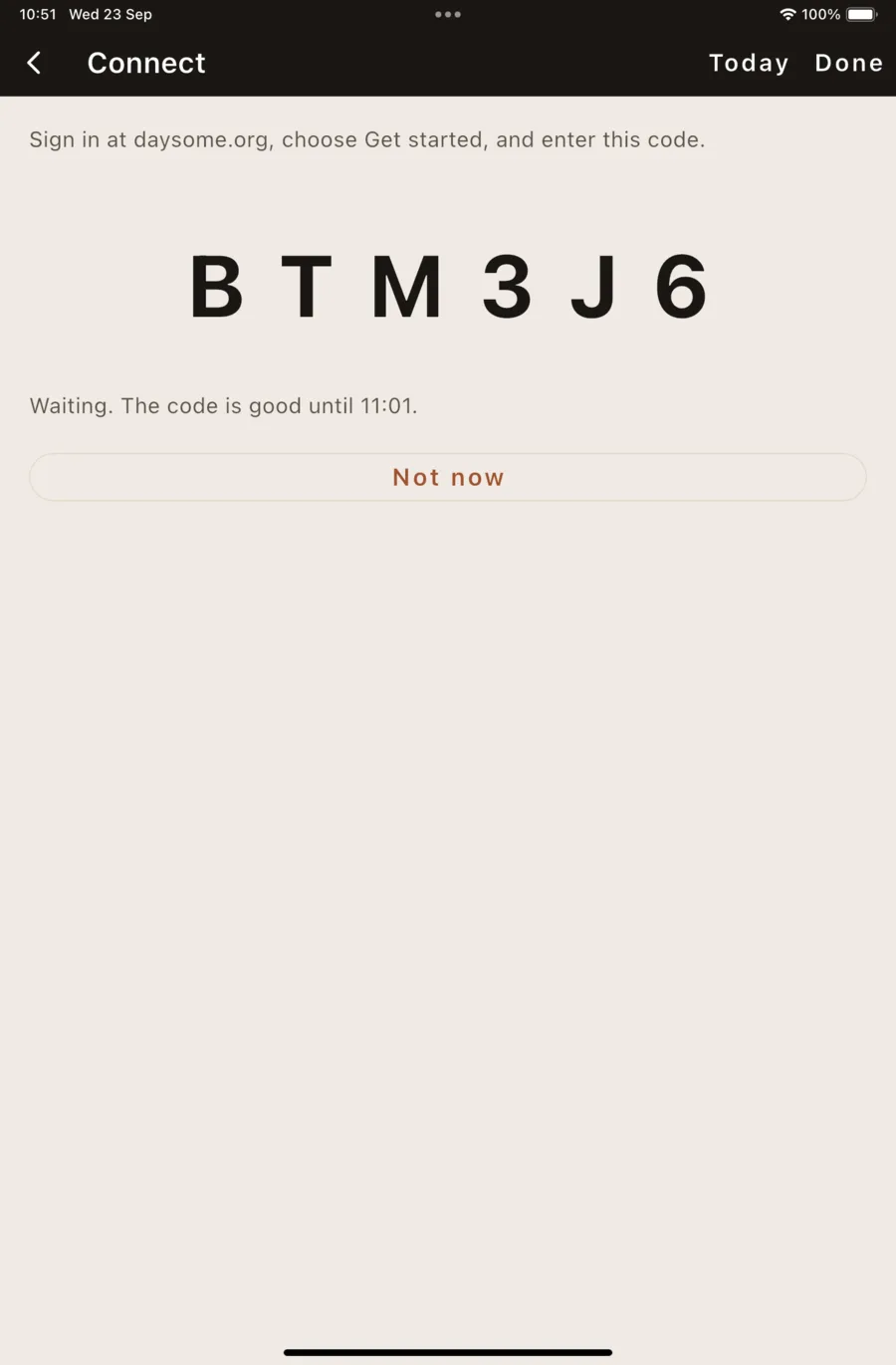
Nothing is typed on the tablet. Behind the PIN, a new row says Connect this tablet. It asks the server for a six-character code, from an alphabet with no zero, no letter O, no one, and no letter I, and shows it very large. The carer signs in at daysome.org, chooses Get started, and enters it. The first person to do that creates the household and owns it. The tablet polls, receives its token exactly once, and puts it in the platform keychain. It is the same instinct as the code on a television, and the same reason: the device that is easiest to read from is the worst one to type on.
The first pairing decides whose day wins. A tablet that has been in a kitchen for a month has a day on it that nobody has typed into any website. So an empty household takes the tablet’s day, all of it, pushed up as one batch, and the site shows what the carer already entered. A second tablet joining a household that already has a day is asked, in the settings, which day it should show, and never pushes its own over the household’s. The bundled example counts as no day.
Local first, then queue, then push. A change on the tablet is applied and shown at once, exactly as before, then queued with an identifier of its own and sent with the next poll. The server applies each operation once, however many times it is replayed, which is what lets the tablet lose its connection mid-afternoon and catch up at tea without doing anything twice. A change that arrived from the server is never sent back, which sounds obvious and took two separate guards.
We watched the whole loop on a simulator, driven by a script: the code, the claim, the tablet’s example day appearing on the site, a tea swap on the tablet arriving on the server, and an entry written on the server arriving on the tablet at the next poll. The person’s display did not change at any point, and there is a test that says it never will.
What stays free
Everything the app does today. The display, the routine, supervisor mode, the meal swap, the note, the special days, the weather phrase. One tablet, set up on the kitchen table, with no account and no network, is the product we released and it stays free. We think a cap on a local app is a worse product wearing a price tag, and a daughter who lives with her mother and never needs the website should never be asked for anything.
Pairing is an addition, never a gate. Nothing on the person’s display changes when a tablet is connected, when a plan lapses, or when the server cannot be reached. That is the same rule as the one that keeps “missed” off the screen: nothing she can see may report a state of the world she cannot do anything about, and a billing failure is the purest example there is.
What is paid for
The household. Editing the day from daysome.org, by everyone looking after them. More than one tablet showing the same day, which turned out to be a requirement we had missed until somebody said “the bedroom too”. Invitations, so the people in a household are the people who should be, and nobody else. And the quiet signal, which is the tablet saying it is awake and when it was last touched, so that a daughter in another town can see the kitchen is on.
That split has a property we value more than the revenue: it is honest to explain in one sentence. The app is free. The plan connects the family.
The trial is on the server, and it starts when a tablet is connected. Thirty days in which the website works, before anybody has paid or been asked to. There are no introductory offers in the stores, because that would be a second trial and a second thing to explain, and because Apple’s reviewer sees a plainer purchase.
Two products, and why those prices
| Product | What it is | Price |
|---|---|---|
| Household, yearly | A subscription that renews until cancelled | £29.99 a year |
| Household, lifetime | One payment, for as long as Daysome exists | £89.99 once |
The anchor for both is the physical dementia day clock, which sells for £60 to £100 and does a fraction of this. A one-off price in that band is a familiar number for a family who would otherwise buy one. The yearly price works out at about £2.50 a month, which is well under anything else in a care budget, and the lifetime price is three times the yearly, deliberately a multiple rather than a discount, because a one-off payment against a server that runs for years is a real liability and the listing will say “lifetime of the product” in as many words.
No monthly plan, at least at launch. It doubles the products to test across three stores, and the period of use here is inherently finite, which makes churn the wrong thing to design around. Both products carry up to three tablets, because a bedroom tablet is the realistic second and a per-tablet add-on is a poor fit for in-app purchase.
Three stores and the problem with the Apple ID
The tablet is now where a purchase happens, and that reintroduces the failure the whole household design was built to avoid. An in-app purchase on her iPad is charged to whichever Apple ID is signed in on it, which is hers, and it renews on her account. There is no app on the daughter’s phone to buy from instead, because the website is the carer’s surface.
Two things answer it. The first is that the plan belongs to the household and not to the buyer, held on the server, so a purchase made anywhere unlocks every tablet in the house, and the website can take the payment from the daughter’s own card. Apple allows an app to honour a subscription bought elsewhere provided the same thing is also sold in the app, and it is. The second is that the in-app purchase exists, works, and is what the reviewer will see, with Restore Purchases and Family Sharing so a daughter in the same family group can be the payer.
What the app may not do is say any of that. Inside the app there is no mention of the website’s price and no suggestion of buying there, because the stores forbid steering and the United Kingdom has not yet been granted the exceptions the United States got. The website and this article can say what they like.
One library for three billing systems. Apple, Google, and Amazon each require their own in-app purchasing for a feature unlocked inside the app, and Fire tablets have no Google Play at all. Three verification stacks on the server, with three kinds of notification, for a one-person team, was the alternative. We chose RevenueCat, which drives all three from one package and sends the server one webhook, keyed by the household. The honest cost is a third party handling purchase metadata, which is now in the privacy policy, and the honest observation from setting it up is that the product and offering configuration is the fiddly part, exactly as remembered from the last time.
The server is the authority. After a purchase the tablet does not trust the store’s receipt. It polls the household until the server says active, which usually takes seconds, and shows “On” in words when it does. Nothing in that screen is ever money except the two prices the stores require us to show, and that screen is behind the PIN, on the carer’s side, on purpose.
Where it stands
The server is built, tested, and proven with three registered apps rather than one, because a backend that only works for its first customer is not the generic thing we set out to make. The tablet pairs, syncs, and shows the plan. The pages a carer will use are generated from the schema and were walked through by hand. What remains is administrative: products in three store consoles, credentials that Google takes a day and a half to honour, and the installation on daysome.org itself. None of it is code, and all of it is the kind of thing that decides the ship date.
Getting it, and telling us where we went wrong
It is out on all three stores now, as the free app this part is about keeping free. The App Store, Google Play, and the Amazon Appstore, and daysome.org carries the links to each. The household plan is not in the shops yet. When it is, the tablet you already have will offer to connect; nothing about the free app changes.
We would still like to hear from you, and that matters to us more than an install does. If you support someone in the early stages of dementia who is still living independently, or you work in dementia care and would be willing to tell us plainly where we have got it wrong, that is the thing we cannot get any other way. If you would try editing the day from your own phone before it is released, say so at daysome.org/testers.html.
Plainly, so nobody is misled: Daysome is an app centred on a display that shows the day. It is not a medical device, not a monitoring system, and not a substitute for anybody. It does not track whether medication has been taken, and it never will.
