

Building for One, Part one: a calm iPad display for someone living with dementia built a calm daily tablet display for someone in the early stages of dementia, and Building for One, Part nine: the free tablet and the paid household built the server that lets a family edit the day from somewhere else. That work is not finished. This part is about the thing we built first instead: the chime, following her out of the app when she is somewhere else on the tablet.
It took two days, four builds, and three reversals, two of them prompted by a real tablet in a real hand. It is in testing on all three platforms now.
TL;DR – The display still does the job while it is on screen. A notification is there only for the moments it is not: laid when the app leaves the screen, taken back when it returns, and never shown over the day itself.
Contents
- Why this came before the backend
- Only while she is away
- Asking at the right moment
- Three platforms, and what each one asks for
- What a notification says, three times
- On Android, the day can come back
- A Focus swallowed the chime
- What we got wrong on the way
- Where it stands
- Getting it, and telling us where we went wrong
Why this came before the backend
Daysome makes one sound. A soft bell when something starts, so that a day clock which only works when she happens to look at it can tell her lunch is ready instead. That chime is in-app audio, deliberately: the tablet is meant to show this app all day, the screen is held awake, and an app already in front of you can simply make a sound. No permission, no banner, nothing scheduled with the operating system. We wrote down at the time that the case this misses, the iPad left in another app, should be decided on its merits if it ever needed solving, and not by drift.
Screen Time decided it. The most honest number in the weekly report is “first used after pickup”, and the day is what she meets when she picks the iPad up, which is the whole product in one statistic. But she plays games on it and reads the news, and nothing in the report says what is in front of her at one o’clock. If she is in Solitaire when lunch starts, nothing happens.
The backend from part nine is waiting on things that are not code: products in three store consoles, and credentials that take a day and a half to work. A notification needs no server at all. That also settles which side of part nine’s line it falls on. The tablet is free and complete, the plan connects the family, and a local notification is the tablet calling her to lunch. It is free, and it carries on if a subscription lapses, because taking the call to lunch away over a billing failure is exactly what we said we would never do.
Only while she is away
One rule shaped everything else. Notifications are pending exactly while the app is off screen. When the day leaves the screen, for another app, the home screen, or a locked tablet, the next week of starts is handed to the operating system. When it comes back, every one of them is taken away again, delivered or not.
That buys more than it looks. There is never a banner over her display, so there is nothing on the day itself for her to wonder about and try to dismiss. There is never a notification and a chime for the same lunch, which would be two calls to one thing. And there is nothing stale left behind: lunch’s notification still sitting in the list at six o’clock would be a missed item by another name, and the first rule of this app is that past items simply drop off. Android can time each notification out when its card would leave the display; iOS cannot, so it relies on the clear when she comes back.
The chime does not catch up. No frames are drawn while the app is away, so the in-app chime hears nothing until it returns. Left alone, its first tick back would find lunch between the last minute it had seen and now, and chime for it half an hour late, after the notification had already called her. We caught that before it shipped, and the first tick after returning is silent now, as it is at launch.
Which things get a notification was already decided. Every item on the day has a switch for whether it makes a sound, on by default for meals, drinks, and visitors, and off for the shape of the day: “Morning” at eight is the day beginning, not a thing to be called to. A notification is just the same call reaching further, so it follows the same switch. Things that start in the same minute share one notification, for the same reason they share one chime.
Asking at the right moment
The setting is off until a carer turns it on, under “Make a sound” in supervisor mode, as “Even in another app”. Turning it on is what asks the system for permission, so Apple’s and Google’s dialogs appear in front of the carer, on purpose, and never in front of her at whatever moment the app happened to open. The plugin we used asks at launch by default, and has to be told not to.
The switch only reads on once the system has said yes. A switch that said on over a refused permission would be a promise the app could not keep, found out at lunchtime. And because iOS asks exactly once, a refusal is followed by a plain sentence saying so and a button that opens Settings, rather than a switch that silently will not move.
What a notification may say was settled before the feature was. It is a line on a lock screen that anybody walking past can read, so it carries only the family’s own words: the label they gave the item and the detail beneath it. Nothing the app writes itself can name a condition or a medicine. Android lists the app’s notification channel in its settings, which is a screen she can reach, so the channel is called “When something starts”.
Three platforms, and what each one asks for
This was the part we expected to be hard, and it was mostly bookkeeping. Each platform wants something different before a notification can be scheduled to the minute.
| Platform | What it needs | Who sees it |
|---|---|---|
| iPad and iPhone | Notification permission, asked once | The carer, when the switch goes on |
| Android 13 and later | Notification permission, asked at runtime | The carer, when the switch goes on |
| Android 14 and later | Leave to schedule exact alarms, on a settings page | The carer, offered after the notification permission |
| Fire OS 7 and 8 | Nothing: Android 9 and 11 predate both rules | Nobody |
Android 14 holds exact alarms back from a new install until somebody allows them, so the app falls back to an inexact alarm when it is refused. On a tablet that is plugged in, and so never in the deep sleep that defers alarms, that is a minute or two late rather than a quarter of an hour. There is a second exact-alarm permission that needs no asking, and we deliberately did not use it: Google restricts it to alarm clocks and calendars, asks for a declaration, and reviews it, and a rejection over that would hold up the whole release rather than this feature.
The plugin also brings a vibration permission with it. Nothing in Daysome vibrates, and that permission is the one that showed up in the Play listing the last time an unused package added it, so it is removed from the build again. A test now pins the exact list of permissions the app declares, so the next addition has to be a decision.
What a notification says, three times
The first one to arrive on a real Fire tablet worked perfectly and looked bare: one line, “Coffee”, and nothing else. A notification is read at a glance, from a shade or a lock screen, and there was nothing to glance at.
So we gave each kind of thing its own picture and heading. A plate and “Time to eat”, a cup and “Time for a drink”, an open door and “Someone is coming”, drawn in the launcher icon’s style. The kind the code calls tablets, which everybody who uses the app sees as “Something else”, got the window from the icon, because medication is not a concept this app has and a picture of a pill would have made it one. The first sunrise we drew for the shape of the day turned out to look like a hotel reception bell, which is the one picture the chime was designed never to suggest. It was redrawn before anybody saw it.
The next notification on the Fire read “Coffee · Someone is coming”, beside a door. A carer had reused a visitor entry for a drink, which is exactly what carers do, and the kind of an item is the field nobody goes back to. Anything keyed on it will be wrong in a real household some of the time, and a wrong picture on her lock screen is worse than none.
The second version keys on nothing that can be wrong. The heading is the display’s own top line, “Friday afternoon”, which is true whatever the item is, and is the line she already reads at the top of the screen. The title is still the family’s label, because the thing comes first everywhere in this app. Underneath is the detail, or the time when there is none, so there is always a second line. And there is one picture for every notification: the window and the light from the launcher icon, generated from the icon’s own source so that it cannot drift from the icon she knows the app by. The colours, which were right the first time, stayed.
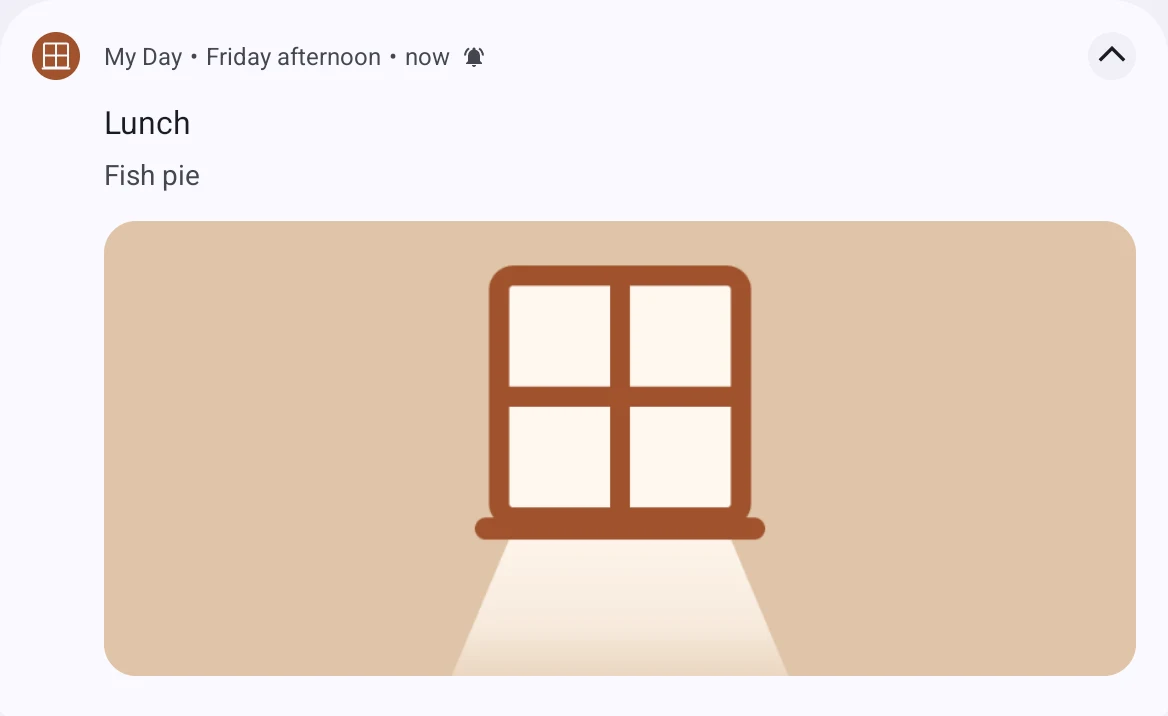
The third version took the picture off where it doubled up. On an iPad the notification showed the app icon on the left, as iOS always does, and our window on the right, which is the same window: the same picture twice. Android’s collapsed notification did the same, its window mark on one side and a square of the window on the other. So iOS carries no picture at all now, and Android shows the banner only when a notification is opened out. Each platform already shows the app’s face, and that turned out to be enough.
On Android, the day can come back
A notification can play a sound and offer a tap. It cannot put the day back up, and on iOS nothing can: no app may bring itself to the front. Android will, with leave, and for a tablet that is docked in a kitchen and used for nothing else, that is the thing a family actually wants. So Android has a third switch, “And bring the day back”: when something starts, the day returns to the front, over whatever else is open.
The leave is a special permission called “Display over other apps”. Nothing in Daysome draws over anything, but since Android 10 that permission is what the system accepts as consent for an app to start itself from the background. It is a settings page rather than a dialog, so the switch explains what is needed and opens the page. Fire OS 7 is old enough not to need it at all.
We proved it on an emulator before anybody relied on it, by reading the reason the system logs for every attempt. With the permission refused, it says it blocked the launch. With it allowed, it says it allowed it because of that permission, from the background, with the screen asleep. The first try reported a different reason, that the app still had a visible window: it was fired too soon after leaving, which proves nothing, and is worth knowing if you try this yourself.
Three decisions came out of the testing. The day comes back three seconds after the start, so the notification’s chime plays out before the app returns and clears it. That one launch is allowed to wake the screen and show over the lock screen, because the day brought back behind a dark, locked tablet is brought back to nobody, and the allowance is withdrawn as soon as the app stops. And the switch turns itself on when the carer comes back from Settings with leave given. Our first version needed a second tap, and on the Fire that read as the switch not working: tapped, Settings opened, still off, and the day never came back. With that fixed, it worked first time on a Fire Max 11.
A Focus swallowed the chime
On the iPad, the first test produced nothing at all. Permission was granted, the switch was on, and the notification was scheduled. But the iPad had a Focus turned on, and a Focus delivers an ordinary notification silently, straight into Notification Centre, with no banner and no sound. Then she opened the app, the app took the delivered notification away exactly as designed, and there was no trace that anything had happened.
With the Focus off it worked. A Focus is something people turn on and forget, so we could not leave it there. Notifications on iOS are now marked time sensitive, a level Apple provides for things that need attention now, which a Focus lets through by default. A household can still turn that off for a particular Focus, and that stays theirs to decide. We did not use critical alerts, which go through silent mode as well but need Apple’s approval and are meant for health and safety, which this is not.
Time sensitive needs a capability on the app’s identifier in Apple’s developer portal, and an App Store provisioning profile regenerated to include it. Apple’s App Store Connect API, which our pipeline uses for everything else, refuses to set that capability, so it is a box ticked by hand. The regenerated profile kept its name, which we did not expect: the last time we regenerated one, Apple added a timestamp to it and an app lost a release over the mismatch.
What we got wrong on the way
An hour went missing twice a year. Writing a test for notifications across the change back to Greenwich Mean Time turned up a bug that had nothing to do with notifications. The app worked out when an item starts by adding its time to midnight as a length of time. On the Sunday the clocks go back the day is twenty-five hours long, and midnight plus thirteen hours is noon, so the display would have shown lunch as happening now an hour early. The clocks change on 25 October, twenty-four days after we found it. Items are clock times again now, built as clock times, with a test for both changes.
A test failed every night. A test that keeps any word about accounts or payment off her display read the real clock, and after the last thing on the day the display says “Nothing else planned today”, which contains the word “plan”. It would have failed any release tagged in the evening. It runs at fixed times now, and looks for the paywall’s word as a whole word.
Laying a week of notifications is slow on Android, because the plugin rewrites its saved list to disk for every one. On a busy emulator sixty took a minute, and if the app came back on screen in that minute, the rest of the list carried on being scheduled after the clear, ready to fire over the display. Each lay is numbered now and stops when a newer clear has overtaken it.
We misread our own instruments. Android’s alarm list keeps the last few removed alarms as history, which counted as live in a quick search and suggested stray notifications that did not exist. Later a script reported nothing scheduled at all when eighty alarms were waiting, because one version of Android writes the field it was looking for with a capital letter. Both cost time, and both came from trusting a count over the raw output.
“Done” threw edits away. Testing the notifications meant editing items in supervisor mode, over and over, and the carer’s side had a Done button in its bar that left supervisor mode, while each form’s Save sat at the bottom, a scroll away. Beside an edit, Done reads as “I have finished this”. It is now “Exit supervisor”, Save is in the bar beside it, and the two are drawn as buttons, filled and outlined, because as plain white words “Save Exit supervisor” read as one three-word label. None of that was in the plan. It came from somebody tripping over it on a real tablet, more than once.
Where it stands
Version 0.4.3 is in TestFlight and Google Play’s internal testing, and on a Fire tablet by sideloading. The chime reaches her in another app on all three platforms, gets through a Focus on the iPad, and on Android can bring the day back to the front. Every one of those was seen working on a real device before this was written, which is the standard we hold this app to, because a test cannot tell you what a tired person sees on a tablet in a kitchen.
The detour is over. Next is finishing what part nine started: the household on daysome.org, the sync, and the paperwork in three store consoles that decides when any of it ships.
Getting it, and telling us where we went wrong
The free app is out on all three stores: the App Store, Google Play, and the Amazon Appstore, with links to each at daysome.org. The notifications in this part will reach the stores with the next release, free like the rest of the tablet, and off until a carer turns them on.
We would like to hear from you, and that matters to us more than an install does. If you support someone in the early stages of dementia who is still living independently, or you work in dementia care and would be willing to tell us plainly where we have got it wrong, that is the thing we cannot get any other way. If you would try a test build, say so at daysome.org/testers.html.
Plainly, so nobody is misled: Daysome is an app centred on a display that shows the day. It is not a medical device, not a monitoring system, and not a substitute for anybody. It does not track whether medication has been taken, and it never will.
