
Multizone | All our technotes
If we've published it, you can find it here.

iOS 12.5.1
iOS 12.5.1 fixes an issue where Exposure Notifications could incorrectly display logging profile language. Exposure Notifications was the one new feature in iOS 12.5, backported from later releases of iOS. It lets you opt-in to the COVID-19 Exposure Notifications system on your iPhone which enables Privacy-Preserving Contact Tracing. System availability depends on support from your local public health authority. The UK COVID-19 apps do not support iOS 12.5.1 iOS 12.5 also provided some security updates and Apple recommend it for all users of devices that can be updated to iOS 12.5 - iPhone 5s, iPhone 6, iPhone 6 Plus, iPad Air, iPad mini 2, iPad mini 3, and iPod touch (6th generation).


TL:DR — Install right away. COVID-19 Exposure notifications system support, Bug fixes, and security fixes.
Step by step instructions
- Open 'Software Update' from 'Settings -> General'
- Download and install, a restart is required and it takes some time
- Details

Microsoft Office for Windows or Mac — What You Need to Know in 2026
If you're still running Office 2016 or Office 2019, the situation has changed significantly. Microsoft ended all support for both versions on October 14, 2025 — meaning no further security patches, no bug fixes, and no technical support of any kind. The apps may still open on your machine, but running unsupported software exposes you to security vulnerabilities that will never be fixed. For most users, staying put is no longer a sensible option.
The connectivity picture is even starker. Office 2016 and Office 2019 for Windows lost the ability to connect reliably to Microsoft 365 services — including Exchange Online, OneDrive, and SharePoint — back in October 2023. If you've noticed Outlook behaving oddly, files failing to sync, or authentication errors, this is almost certainly why. Those issues won't be resolved by reinstalling or repairing your existing Office installation. The version itself is the problem.
Mac users face an additional deadline. From July 13, 2026, Office 2019 for Mac — along with Office 2021 for Mac — will enter a reduced functionality mode on devices running macOS. In practice, that means the apps will open and print existing files but will no longer let you edit, save, or create documents. Office 2019 for Mac reached end of support on October 10, 2023, so there is no update path available — the only resolution is to move to a newer release entirely.
After October 14, 2025, Microsoft no longer provides technical support, bug fixes, or security fixes for Office 2016 and Office 2019.
What are your options?
The two realistic paths forward are a Microsoft 365 subscription or a one-time purchase of a perpetual licence. Microsoft naturally pushes the subscription route — Microsoft 365 Apps for enterprise or the consumer Microsoft 365 Personal and Family plans — and for users who want the latest features, AI integrations, and guaranteed compatibility with Microsoft's cloud services, that's a reasonable choice.
That said, subscriptions aren't for everyone. If you'd rather make a single purchase and own your software outright, Office LTSC 2024 is the current perpetual release for Windows and Mac. It receives mainstream support through October 9, 2029, and — crucially — it's supported for connecting to Microsoft 365 services for the same period. Office LTSC 2021 is still available but its connectivity support window closes in October 2026, so it's a short runway for a new purchase.
For home and small business users, the consumer equivalent of the perpetual licence is Microsoft Office 2024 (Home & Student or Home & Business editions), available as a one-time purchase from Microsoft or authorised retailers. It installs on one PC or Mac, carries no recurring fee, and is fully supported through 2029. If the subscription model has always felt like renting something you've already paid for several times over, this remains a legitimate and cost-effective alternative — just make sure you're buying from an authorised source.
Key dates at a glance
- October 13, 2020 — Office 2016 for Mac reached end of support
- October 10, 2023 — Office 2019 for Mac reached end of support; Office 2016 and 2019 for Windows lost Microsoft 365 service connectivity support
- October 14, 2025 — Office 2016 and Office 2019 for Windows reached full end of support
- July 13, 2026 — Office 2019 and Office 2021 for Mac enter reduced functionality mode on older macOS versions (editing and saving disabled)
- October 13, 2026 — Office LTSC 2021 connectivity support for Microsoft 365 services ends
- October 9, 2029 — Office LTSC 2024 / Office 2024 end of support
Do you need to act immediately?
If you're on Windows and using Office purely offline — no Exchange, no OneDrive, no SharePoint — your apps will continue to function for now. The risk is cumulative: without security updates, any vulnerability discovered from October 2025 onwards will remain permanently unpatched. For anything involving sensitive data or regular internet connectivity, that's a meaningful exposure.
If you're on a Mac running Office 2019, the July 2026 reduced functionality deadline makes the decision more urgent. Once that mode kicks in, the software becomes effectively read-only — and because Office 2019 for Mac can no longer receive updates, there is no fix short of upgrading to a current release. Waiting until July to act will leave you scrambling.
The minimum macOS version required to update Office sucessfully is macOS 12 Monterey. If your Mac can run Monterey or later and you upgrade your Office version to a currently supported release, you'll be clear of the July 2026 cutoff.
- Details

In 2026, Apple's official documentation on using an external drive as a macOS home folder location has effectively disappeared. Whether quietly retired or simply buried, the guidance is gone — and the underlying risk it once described is very much still present.
Using an external or removable drive as a home folder requires meticulous attention to keep it continuously powered and mounted. If it disconnects at the wrong moment — particularly during a macOS system update — macOS may fail to locate the designated mount point and silently replace it with a freshly initialised local directory, complete with default folders and placeholder documents. Your data isn't gone, but macOS will behave as though it is.
TL;DR – This is an obscure failure mode that can consume hours to diagnose, and it remains unacknowledged in Apple's current support documentation. A test even for the Genius Bar!
{ToC}
Why this matters more now
External home folders were once a recognised and even encouraged configuration. Apple's own Mac mini Server and many build-to-order Mac Pro models shipped with multiple internal drives — one for the system, one for user data — precisely because separating the OS from home directories was considered good practice. That era is largely over. Apple Silicon Macs have no internal drive expansion, and the current Apple support page covering home folder locations makes no mention of external or alternative drives at all.
The omission is telling. It is reasonable to infer that Apple has quietly stepped back from endorsing the configuration, not because it is impossible, but because the failure mode described in this article — and the support burden it creates — makes it difficult to recommend without significant caveats.
The missing mount point
For users who do rely on external drives or network locations for home folder storage, the core risk is straightforward but easy to overlook: macOS does not gracefully handle a missing mount point at login. Instead of pausing, warning the user, or falling back safely, it may simply create a new local directory at the expected path and proceed as if nothing is wrong.
The result is a login session that appears normal. Default Desktop and Documents folders are present. No error is shown. The user's actual data — still intact on the disconnected drive — is invisible until the problem is diagnosed and the mount point is restored.
A ghost from Unix past
This behaviour will be immediately familiar to anyone who has administered NFS-mounted home directories on SunOS, Solaris, or early Linux environments. A missing network mount at login time could produce exactly the same symptom: a clean, empty home directory conjured up in place of the real one. The underlying Unix model hasn't changed, and neither has the hazard.
Without that background, a user encountering this for the first time has little to go on. There is no alert, no log entry surfaced in a user-facing way, and no recovery prompt. The situation looks, superficially, like catastrophic data loss.
Complicated to fix
The resolution requires logging in under a separate administrator account — which itself assumes one exists and is accessible. From there, the spurious /Volumes/Home directory and its auto-generated subdirectories must be deleted manually. The external drive is then detached, reattached, and the system rebooted.
On restart, /Volumes/Home remounts correctly from the external drive, and login proceeds normally. No data is lost, but the path to that conclusion is neither obvious nor documented in any current Apple support article.
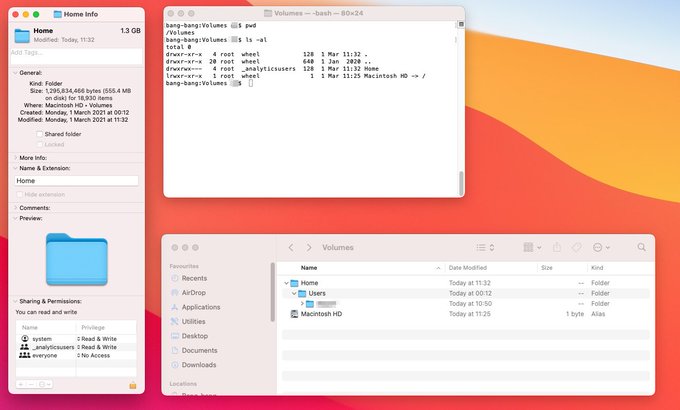
/Volumes/Home showing a freshly created local folder rather than the expected external drive mount point.2026 update: what has changed
The practical landscape has shifted in a few important ways since this issue was first documented:
- Apple Silicon and sealed system volumes. Macs running Apple Silicon use a sealed, read-only system volume by default. This makes the system partition more resilient, but it does nothing to protect a home folder stored on a separately mounted external drive. The risk described here is entirely unaffected by the move to Apple Silicon.
- macOS update behaviour. Incremental system updates under macOS Sequoia and its successors still carry the same hazard. An update that requires a restart will unmount external drives as part of the reboot sequence. If the drive does not remount before the login process checks the home folder path, the failure mode can trigger.
- Disappearing documentation. Apple's support article at support.apple.com/en-gb/102547 covers home folders but no longer references external drives or alternative mount points. This represents a meaningful change from earlier versions of the documentation, which I am sure acknowledged the configuration explicitly but perhaps I imagined it.
- No built-in safeguard has been added. As of 2026, macOS still does not present a warning or recovery option when a home folder mount point is missing at login. Agood reason being that it is unsupported and therefore not a valid test or documentation candidate. The behaviour however remains silent and potentially misleading.
Practical recommendations
If you are running, or considering, a configuration where your home folder lives on an external drive, the following steps reduce — though do not eliminate — the risk:
- Always maintain a separate local administrator account that does not depend on the external drive. This is your recovery path if things go wrong.
- Ensure the external drive is powered and mounted before initiating any macOS update that requires a restart.
- Consider using a bus-powered drive only if the host port reliably supplies power during the reboot cycle — this varies by Mac model and should be tested rather than assumed.
- Periodically verify that
/Volumes/Home(or your configured mount point) is resolving to the external drive and not a local shadow directory. A quick check in Terminal withls -la /Volumes/takes seconds and can catch the problem early. - Maintain a current backup. Time Machine or a third-party equivalent remains essential — not because this failure mode destroys data, but because diagnosing it under pressure is far easier when you know the data is safe.
The configuration is not inherently broken, but it requires the kind of deliberate system administration awareness that Apple's current documentation no longer prompts users to apply. In the absence of that guidance, the burden falls entirely on the user — and the failure, when it occurs, is silent enough to be genuinely alarming.
- Details

What is a warrant canary?
"As of 26 May 2026, we have not received any court orders subject to being kept secret."
A warrant canary is a proactive statement released by a service provider indicating that, as of a specified date, they have not received any secret court orders. If this statement is removed, users can infer that the provider has likely received such an order, thereby compromising their transparency. This method aims to inform users of potential government surveillance without violating legal gag orders. The effectiveness of warrant canaries is a topic of ongoing debate, particularly regarding their legal protections and implications.
In the face of increasing government surveillance concerns, warrant canaries have become a vital aspect of discussions on transparency. However, their legal status remains ambiguous, with some courts yet to clarify whether failing to update a warrant canary constitutes a breach of a gag order.
In the UK, surveillance is governed by the Investigatory Powers Act 2016, which superseded earlier legislation. This act includes stringent penalties for unauthorized disclosures regarding secret notices. In the US, the landscape is shaped by the USA PATRIOT Act and the more recent EARN IT Act, both enforcing severe penalties for disclosing the existence of such orders.
{ToC}
Tipping-off - Investigatory Powers Act 2016, Section 54
(4) A person who makes a disclosure to any other person of anything that they are required by a section 49 notice to keep secret shall be guilty of an offence and liable—
(a) on conviction on indictment, to imprisonment for a term not exceeding five years or to a fine, or to both;
(b) on summary conviction, to imprisonment for a term not exceeding six months or to a fine not exceeding the statutory maximum, or to both.
Recent developments
In 2026, many tech companies have shifted their approach to warrant canaries. For instance, Proton AG, the organization behind ProtonMail, has made headlines by consistently updating its website as part of its transparency reports whenever there is a notable legal request and notes that a warrant canary is not meaningful under Swiss law.
Warrant canaries in practice
In 2013, Apple made headlines by including a statement in their transparency report that could serve as a warrant canary: “Apple has never received an order under Section 215 of the USA PATRIOT Act.” However, as of 2026, Apple no longer includes such statements, possibly acknowledging that removing a canary could be interpreted as confirmation of a gag order being in effect. Instead, Apple has shifted towards providing detailed statistics on the number and types of governmental requests received, which is a welcome development in terms of user transparency.
Transparency - Government requests - Apple Inc.

The usefulness of warrant canaries in 2026
While warrant canaries represented an innovative approach to transparency a few years ago, their practical utility has diminished. The legal ambiguity surrounding them has led to a decline in industry support. Many companies are now prioritising clearer communication about their data handling practices and government interactions, which may render the concept of warrant canaries less important in the current landscape. Nevertheless, they remain a fascinating relic of the ongoing conversation about privacy, surveillance, and user rights.
- Details

Amazon Fire TV Cube - The ultimate hands-free streaming media player of 2026, featuring enhanced Alexa integration, Wi-Fi 6E, and stunning 4K Ultra HD streaming capabilities.
Fire TV Cube features and functionality
Twice as powerful as Fire TV Stick 4K Max.
- Significantly faster and more powerful than previous models, with advanced processing capabilities.
- Seamless hands-free voice control: just say the command to manage your TV, smart home devices, and more without needing a remote.
- Full compatibility with various satellite set-top boxes and other devices using Alexa's voice commands.
- Multiple connectivity options including HDMI, USB-C for storage expansion, and a dedicated Ethernet port for stable wired connections.
- Now includes the upgraded Alexa Voice Remote Pro, which boasts enhanced TV controls and customizable buttons.
TL:DR – The Fire TV Cube has transformed my streaming experience. Commands like "Alexa, turn on the TV" have become second nature. The device operates flawlessly, although it defaults to the Fire TV input, requiring a manual switch for other devices like cable boxes or Blu-ray players.
- Details

First ever Warzone victory.
I play far too much Call of Duty® Modern_Warfare® and dont play much 'Warzone' but Im a completionist and want to get the ribbons for my officer progression. I'm not great at Warzone and often get wiped out very early on. But this time. Well this time was special. I missed the guy in the window, and my airstrike was off target but it definitely spooked them! And we won. Phew.
- Details

macOS Big Sur and VMware Fusion
It is easy to install macOS Big Sur as a virtual machine in VMware Fusion on a Intel based Mac provided you create a bootable installer from which to install the Mac operating system. Using macOS Big Sur in a virtual machine in VMware Fusion is expressly permitted by the macOS licence agreement provided you are running on Apple hardware and you obtain macOS Big Sur legally from Apple.
It runs beautifully and is perfect for testing and development workloads.
TL:DR — Get VMware Fusion, Install VMware Fusion, download macOS Big Sur from Apple, create a bootable USB of macOS Big Sur and it can be installed in VMware Fusion just perfectly.
- Details
Read more: Install macOS Big Sur in VMware Fusion on a Intel based Mac
