

In 2026, Apple's official documentation on using an external drive as a macOS home folder location has effectively disappeared. Whether quietly retired or simply buried, the guidance is gone — and the underlying risk it once described is very much still present.
Using an external or removable drive as a home folder requires meticulous attention to keep it continuously powered and mounted. If it disconnects at the wrong moment — particularly during a macOS system update — macOS may fail to locate the designated mount point and silently replace it with a freshly initialised local directory, complete with default folders and placeholder documents. Your data isn't gone, but macOS will behave as though it is.
TL;DR – This is an obscure failure mode that can consume hours to diagnose, and it remains unacknowledged in Apple's current support documentation. A test even for the Genius Bar!
Contents
Why this matters more now
External home folders were once a recognised and even encouraged configuration. Apple's own Mac mini Server and many build-to-order Mac Pro models shipped with multiple internal drives — one for the system, one for user data — precisely because separating the OS from home directories was considered good practice. That era is largely over. Apple Silicon Macs have no internal drive expansion, and the current Apple support page covering home folder locations makes no mention of external or alternative drives at all.
The omission is telling. It is reasonable to infer that Apple has quietly stepped back from endorsing the configuration, not because it is impossible, but because the failure mode described in this article — and the support burden it creates — makes it difficult to recommend without significant caveats.
The missing mount point
For users who do rely on external drives or network locations for home folder storage, the core risk is straightforward but easy to overlook: macOS does not gracefully handle a missing mount point at login. Instead of pausing, warning the user, or falling back safely, it may simply create a new local directory at the expected path and proceed as if nothing is wrong.
The result is a login session that appears normal. Default Desktop and Documents folders are present. No error is shown. The user's actual data — still intact on the disconnected drive — is invisible until the problem is diagnosed and the mount point is restored.
A ghost from Unix past
This behaviour will be immediately familiar to anyone who has administered NFS-mounted home directories on SunOS, Solaris, or early Linux environments. A missing network mount at login time could produce exactly the same symptom: a clean, empty home directory conjured up in place of the real one. The underlying Unix model hasn't changed, and neither has the hazard.
Without that background, a user encountering this for the first time has little to go on. There is no alert, no log entry surfaced in a user-facing way, and no recovery prompt. The situation looks, superficially, like catastrophic data loss.
Complicated to fix
The resolution requires logging in under a separate administrator account — which itself assumes one exists and is accessible. From there, the spurious /Volumes/Home directory and its auto-generated subdirectories must be deleted manually. The external drive is then detached, reattached, and the system rebooted.
On restart, /Volumes/Home remounts correctly from the external drive, and login proceeds normally. No data is lost, but the path to that conclusion is neither obvious nor documented in any current Apple support article.
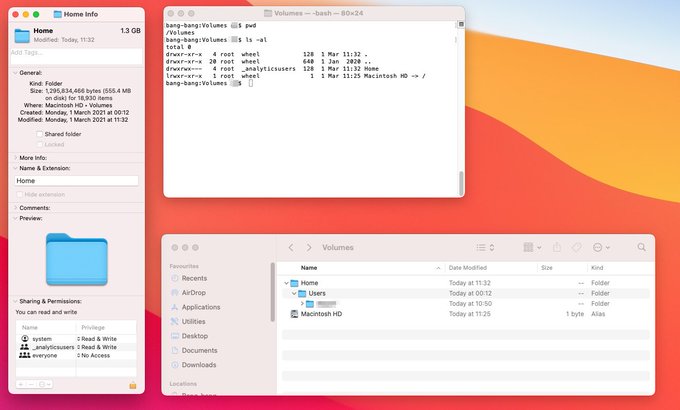
/Volumes/Home showing a freshly created local folder rather than the expected external drive mount point.2026 update: what has changed
The practical landscape has shifted in a few important ways since this issue was first documented:
- Apple Silicon and sealed system volumes. Macs running Apple Silicon use a sealed, read-only system volume by default. This makes the system partition more resilient, but it does nothing to protect a home folder stored on a separately mounted external drive. The risk described here is entirely unaffected by the move to Apple Silicon.
- macOS update behaviour. Incremental system updates under macOS Sequoia and its successors still carry the same hazard. An update that requires a restart will unmount external drives as part of the reboot sequence. If the drive does not remount before the login process checks the home folder path, the failure mode can trigger.
- Disappearing documentation. Apple's support article at support.apple.com/en-gb/102547 covers home folders but no longer references external drives or alternative mount points. This represents a meaningful change from earlier versions of the documentation, which I am sure acknowledged the configuration explicitly but perhaps I imagined it.
- No built-in safeguard has been added. As of 2026, macOS still does not present a warning or recovery option when a home folder mount point is missing at login. Agood reason being that it is unsupported and therefore not a valid test or documentation candidate. The behaviour however remains silent and potentially misleading.
Practical recommendations
If you are running, or considering, a configuration where your home folder lives on an external drive, the following steps reduce — though do not eliminate — the risk:
- Always maintain a separate local administrator account that does not depend on the external drive. This is your recovery path if things go wrong.
- Ensure the external drive is powered and mounted before initiating any macOS update that requires a restart.
- Consider using a bus-powered drive only if the host port reliably supplies power during the reboot cycle — this varies by Mac model and should be tested rather than assumed.
- Periodically verify that
/Volumes/Home(or your configured mount point) is resolving to the external drive and not a local shadow directory. A quick check in Terminal withls -la /Volumes/takes seconds and can catch the problem early. - Maintain a current backup. Time Machine or a third-party equivalent remains essential — not because this failure mode destroys data, but because diagnosing it under pressure is far easier when you know the data is safe.
The configuration is not inherently broken, but it requires the kind of deliberate system administration awareness that Apple's current documentation no longer prompts users to apply. In the absence of that guidance, the burden falls entirely on the user — and the failure, when it occurs, is silent enough to be genuinely alarming.
