
Multizone | All our technotes
If we've published it, you can find it here.

Microsoft's decision to sunset Windows Subsystem for Android (WSA) and, with it, the Amazon Appstore on Windows 11, is now fully in the rear-view mirror. Support ended on March 5, 2025, and as of 2026 the dust has well and truly settled. What remains is a clear-eyed post-mortem on one of the more ambitious — and ultimately ill-fated — cross-platform experiments in recent Windows history, and a practical guide to where Windows users who want Android apps should turn today.
Amazon Appstore on Windows 11 — End of Life
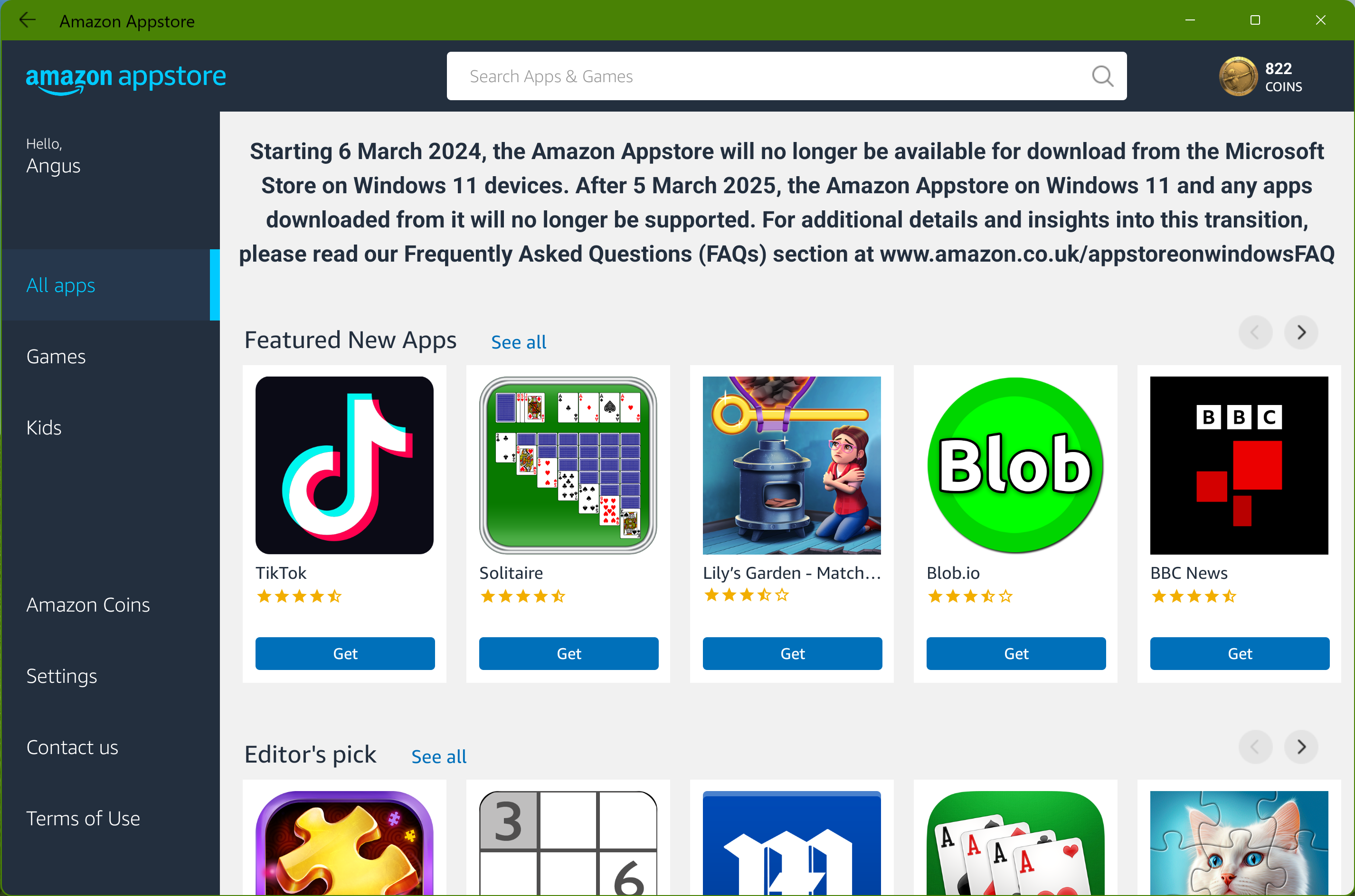
The Amazon Appstore was removed from the Microsoft Store for new downloads from March 6, 2024. All support for the Amazon Appstore on Windows 11, and any apps downloaded through it, ended on March 5, 2025. The subsystem is no longer available, no longer updated, and no longer supported by either Microsoft or Amazon.
In this article we examine the background to that decision, the reasons it was always likely to happen, what it meant for users and developers at the time, and — crucially — what the realistic options look like now that the project is definitively gone.
TL;DR: Microsoft threw in the towel. If you want seamless Android on a computing device, a Chromebook or an Android tablet remains the cleanest path. If you are a developer who needs to test Android apps on a desktop, Android Studio's built-in emulator — regularly updated by Google and now running Android 15 — is the right tool.
{ToC}
Why the sunset of Windows Subsystem for Android was always coming
Microsoft's decision to end WSA surprised some commentators, but the warning signs had been accumulating for well over a year before the announcement. The project had its public preview in February 2022, followed by a series of roughly bimonthly releases through to June 2023 — and then nothing. No release for the remainder of Microsoft's financial year. In any large technology organisation, a project that goes quiet across an entire fiscal year is rarely being quietly perfected; it is being quietly wound down.
There is also a historical precedent that should have given anyone watching pause. BlackBerry integrated Android APIs and delivered the Amazon Appstore inside BlackBerry 10 as a late-stage attempt to rescue a dying platform. The parallels are uncomfortable: a proprietary platform, a third-party app store standing in for Google Play, and a fundamental unwillingness — or inability — to licence the Google services that make Android apps actually work for mainstream users. BlackBerry World failed. The Amazon Appstore on BlackBerry 10 failed. The entire BlackBerry OS failed. WSA followed a structurally identical path on a much larger platform.
The sheer scale of engineering effort involved in keeping WSA current was also unsustainable without a clear commercial return. The January 2023 release note "Windows Subsystem for Android updated to Android 13" sounds innocuous, but migrating an entire virtualised Android stack to a new major OS version — with all the build, integration, and hardware compatibility testing that entails — is a significant undertaking. Doing that work indefinitely for a product with limited adoption and no viable path to Google Play is a hard case to make in any budget cycle.
What was the Windows Subsystem for Android?
What it was and how it worked
Windows Subsystem for Android, introduced in 2022, was Microsoft's attempt to bridge the Windows and Android ecosystems. At its core it was a virtual machine running the Android Open Source Project (AOSP), packaged for the Microsoft Store and front-ended with the Amazon Appstore as the mechanism for installing apps. It was not an emulator in the traditional sense — it ran Android natively inside a Hyper-V container — but it was also not a full Android environment in any way a mainstream user would recognise.
The development drew on the success of Windows Subsystem for Linux, which had proven that running a foreign OS environment inside Windows could be genuinely useful. WSA aimed for a similar outcome with Android. The competitive pressure was real: Apple Silicon Macs had been running iOS and iPadOS apps natively from the App Store since late 2020, and Chromebooks had offered seamless Google Play integration for years. Microsoft's mobile app story on Windows had been weak since the collapse of Windows Phone, and WSA was the attempt to address that gap.
What it could and could not do
At the point of the end-of-life announcement, WSA had reached Android 13 and supported a reasonable range of hardware features. Camera, microphone, Wi-Fi, location, multitouch, multi-monitor output, picture-in-picture, and Widevine L3 DRM were all functional. However, Bluetooth, USB, Android widgets, hardware DRM, quick tiles, and seamless file transfer were either absent or incomplete. The roadmap items — file transfer, shortcuts, local network access by default — were never delivered.
More importantly, none of that feature work addressed the fundamental problem: without Google Play Services, the majority of Android apps that mainstream users actually want either would not install, would not function correctly, or would lack push notifications entirely. The feature table on the GitHub repository was impressive in places, but it was a table of work done on the wrong problem.
The Google Play problem — the real reason WSA failed
Every post-mortem of WSA eventually arrives at the same place: Google Play and Google Play Services. Android may be open source through AOSP, but Google licences Play Services and the Play Store under strict criteria that require device manufacturers to pre-install a defined suite of Google applications. This is a deliberate and effective control point over the Android ecosystem, and it is one that Microsoft was never going to satisfy on its own platform.
The BlackBerry comparison is instructive here. BlackBerry's management reportedly could not accept the requirement to ship Gmail, Google Maps, Google Calendar, and the full suite of Google applications pre-installed on their devices as a condition of Play Services licencing. Without that agreement, BlackBerry could not offer a credible Android experience. Microsoft faced an identical structural problem — and the idea of Google effectively mandating which applications ship on Windows devices was never a negotiation that was going to conclude happily for either party.
Google walked away from the table. Without Play Services there was no path to the apps people actually wanted, and without those apps there was no adoption case to sustain the project.
This was confirmed shortly after the end-of-life announcement by what appeared to be a Microsoft product manager on 𝕏, and subsequently reported by 9to5Google. The absence of Google Play Services was not a technical oversight or a future roadmap item — it was a commercial and political dead end that had been apparent from the beginning.
Amazon's Fire OS is the only meaningful example of an AOSP-derived platform succeeding without Google Play, and that success is built on a very specific foundation: cheap, subsidised tablets sold primarily as consumption devices for Amazon's own content ecosystem — Prime Video, Kindle, Amazon Music. There was never a realistic version of that dynamic applying to Windows 11 desktops and laptops. The Amazon Appstore on WSA had no equivalent gravitational pull.
Sideloading apps via Android Debug Bridge (ADB) was technically possible but was aimed squarely at developers and hobbyists. It was never going to drive mainstream adoption, and Microsoft treated it as such — barely acknowledged in official documentation and unsupported in any practical sense for ordinary users.
Where things stand in 2026
With WSA gone and the March 2025 support deadline now passed, the question for anyone who was using it — or who is arriving at this article wondering what their options are — is what actually works today.
The honest answer is that nothing on Windows has filled the gap WSA left, because the gap WSA left was never as large as the project's ambition suggested. The users who genuinely needed to run Android apps on Windows were always a relatively small population, and most of them have migrated to one of three paths.
For end users who want Android apps as part of their daily computing life, a Chromebook remains the most coherent answer. Google Play integration on ChromeOS is mature, well-maintained, and covers the overwhelming majority of Android apps. Chromebook hardware in 2026 spans a wide range of price points and form factors, and the platform has continued to receive investment from Google in ways that WSA never received from Microsoft. For users who are already in the Android ecosystem — with a Pixel phone or a Samsung Galaxy device — the continuity between phone and Chromebook is natural.
For developers, Android Studio from Google is the current standard. The built-in emulator now runs Android 15, is regularly updated alongside new Android releases, and supports the full range of Google Play Services in a way that WSA never could. It runs on Windows, macOS, and Linux. It is not a consumer product, but developers who were using WSA for testing were already operating in developer territory — Android Studio is simply the correct tool for that job, and it has been for years.
There is also a renewed conversation in 2026 around whether Microsoft will make another attempt at Android integration, particularly given the continued growth of ARM-based Windows devices and the Surface Pro line. The architectural alignment between modern Windows on ARM and Android on ARM makes the technical case more interesting than it was in 2022. But any future attempt would face the same fundamental commercial obstacle: Google Play Services licencing. Until that negotiation changes — and there is no current indication that it will — any WSA successor would be building on the same broken foundation.
Impact on users and developers
Users
The population of users who relied on WSA was always limited by the Amazon Appstore's catalogue. Without Google Play Services, apps requiring push notifications, Google Maps integration, Google Sign-In, or Firebase-based features either failed silently or required significant workarounds. The apps that worked well on WSA tended to be games and simple utilities — a narrow slice of what most people actually use Android for.
Those users have now had well over a year since the March 2025 deadline to find alternatives. For most, the transition was not as painful as the headlines at the time suggested, precisely because the dependency was shallower than it appeared.
Developers
Developers who invested in WSA-specific compatibility work should have deprecated that code well before the March 2025 deadline — and most sensible teams did. Any code paths added specifically to handle the WSA environment, or to work around the absence of Google Play Services in that context, are now dead weight. The distribution channel no longer exists.
The broader lesson for developers is one that was already well understood but bears repeating: building for a platform whose commercial viability depends on a licencing agreement between two large companies that have competing interests is a significant risk. The Amazon Appstore on Windows was always contingent on a set of relationships that were never stable.
Industry response and what it revealed
The tech press response to the WSA shutdown was consistent: near-universal identification of Google Play Services as the core problem, with secondary commentary on Microsoft's pattern of launching and then abandoning platform experiments. That pattern — from Windows Phone to Cortana to Mixer to WSA — is a recurring theme in how Microsoft's ambitions in consumer and platform spaces tend to resolve.
Apple and Google were not materially affected. Apple Silicon Macs continue to run iOS and iPadOS apps from the App Store with no friction. ChromeOS continues to offer Google Play. Neither platform had to do anything differently as a result of WSA's closure — they were already further ahead than WSA ever managed to get.
What the episode did usefully illustrate is the degree to which Google's control over the Android ecosystem extends beyond the open-source layer. AOSP is genuinely open. But AOSP without Play Services is, for most users and most apps, not Android in any meaningful sense. That distinction matters for anyone evaluating Android-adjacent platforms — whether that is a future Microsoft product, a new Chinese device manufacturer, or an open-source Android fork.
Conclusion
Microsoft's Windows Subsystem for Android was a technically ambitious project that ran into a commercially immovable obstacle. The engineering work was real and in places impressive — running Android 13 inside a Windows virtual machine with camera, GPS, multitouch, and DRM support is not trivial. But the project was solving the wrong problem. The question was never whether Android could run on Windows. The question was whether the apps people actually use — the ones built on Google Play Services — could run on Windows without Google's participation. They could not, and Google was not going to participate on terms acceptable to Microsoft.
The cautionary note here is not unique to Microsoft. Large technology companies regularly invest in platform experiments that are structurally dependent on cooperation from a competitor who has no incentive to cooperate. The business case for WSA presumably rested on revenue from the Amazon Appstore, but that revenue potential was always capped by the Appstore's catalogue, which was always capped by the absence of Google Play Services. The ceiling was visible from the beginning.
Stopping a project that has no viable path forward is the right call, even when the sunk cost is significant. What is harder to defend is starting a project of this scale without resolving the central commercial dependency first. That is the real lesson of WSA — and it applies well beyond this particular episode.
Status as of 2026
Windows Subsystem for Android is no longer available, no longer supported, and no longer under development. The Amazon Appstore on Windows 11 reached end of life on March 5, 2025. Microsoft has not announced a successor product. For Android app access, current practical options are ChromeOS with Google Play, or Android Studio's emulator for developers.
Source: https://learn.microsoft.com/en-us/windows/android/wsa/
- Details

File Sharing securely with external users and with adequate governance is hard. You might think you can just easily mandate a file sharing Software as a Service (SaaS) platform as part of your productivity suite, (Google Workspace has Google Drive, Microsoft 365 has Microsoft OneDrive, Apple has iCloud or there's always a third party SaaS like the venerable DropBox), but hold on before you do so. In exchange for a simple user experience you give up control over your data hosting to the cloud service provider. That might be fine for your organisation, and it is for a lot of organisations, but for some data workloads with sensitive, private or privileged data it could well not be acceptable.
{ToC}
Five reasons why a Software as a Service (SaaS) platform might fail your organisations criteria for secure file sharing technology
There are probably more but here are five:
- Firstly, SaaS providers might be required to give access to their data to other agencies by regulation or for other reasons although like DropBox they may appear to be transparent about it.
- Secondly, they might index your content as Windows does if you let it by enabling "Cloud content search", leading to the potential for serving information in search results to users who should not be able to see it.
- Thirdly, your SaaS provider might harvest the data for use in training a large language model (LLM) for Artificial Intelligence (AI), with the resulting risk posited by Google in "Privacy Considerations in Large Language Models" that training data appears in output or could be subject to a training data extraction attack.
- Fourthly, they might change their terms and conditions or like Skiff be acquired and shut down.
- In extreme cases, (looking at you, Amazon Drive), they may just throw in the towel and cease operating the service altogether.
Evaluating secure file sharing against an information security policy framework
Recently, we conducted an evaluation of secure file sharing technology for suitability for sharing securely with users both internal and external to an organisation in a regulated market sector. This was an interesting exercise, which made us spend further time thinking about the issues around secure sharing of company information in the cloud, and the almost automatic use these days of the technologies tied to an organisations business cloud software provider. The criteria we set were informed by our own information security policy framework as we look to become ISO27001 certified.
Information Security Criteria
Whatever system is chosen must preserve information security. It should ensure that access to the system is only given to the right people, to the right data, and at the right time.
- Access Control – Measures to control who can access the data and what actions they can perform.
- Authentication – Authentication, authorisation and revocation mechanisms strong enough to verify the identity of users accessing the service.
- Auditing and Logging – Detailed logs of all activities and accesses to the data, allowing for accountability and traceability.
- Incident Response – Procedures to respond and mitigate changes, continuity, disaster, security incidents or breaches.
- Data Encryption – Encryption to protect data from unauthorized access.
- Data Integrity – Maintenance and assurance of data over its entire life-cycle.
- Data Deletion and Disposal – Supports procedures for securely deleting and disposing of data when it is no longer needed.
- Data Governance – Policies and procedures for the proper management and use of data within the organization.
- Data Classification – Data classification based on its sensitivity.
- Network Security – Prevention of unauthorized access and protection against external threats.
- Vendor Risk Management – Assessment and management of security risks associated with third-party vendors or partners involved in the data sharing process.
- User Training and Awareness – Education available to users about security best practices to help prevent security incidents.
- Secure Development Lifecycle – Security in the software development process must be respected.
- Security Monitoring – Tools and processes for continuous monitoring of the service and its environment for potential security issues.
- Compliance and Regulatory Requirements – Ensure that the service complies with relevant laws, regulations, and industry standards.
Functionality and ease of use
Functionality and ease of use only matters if the information security criteria are met.
- Ease of use – There should be a fully featured web App, Windows, Mac desktop drive/volume level support is desirable, folder level support acceptable. iOS and Android Apps are highly desirable.
- Functionality – Branded Portal, Let's Encrypt SSL support, Custom URL, Shared Files and Folders, (password protection, public, time timited), Unlimited storage. Comprehensive email notifications.
No system guarantees everything in an information security policy
This exercise is not about criticising systems that cannot guarantee total compliance with information security policies. None are perfect, It is more to show that if information security cannot be guaranteed then the risks should be quantified, written down, subject to regular review and accepted by the executive management of the business.
TL:DR: Operating system vendor solutions and well known SaaS services cannot easily be made to satisfy all of these conditions. The only way to guarantee compliance with strict information security policies is to self host with a technology and platform that enables you to encrypt your data in transit and at rest. You have to have the keys to the kingdom!
- Details
Read more: Secure file sharing information security policy framework

An Overview
Artificial Intelligence (AI) is a buzzword that seems to pop up everywhere these days. From virtual assistants like Siri and Alexa to self-driving cars and recommendation algorithms on streaming platforms, AI is making significant strides in transforming how we live and work. But what exactly is AI? What are its various forms? How is it shaping our future? In this article, we will delve into the world of AI, its subfields, benefits, limitations, and the ethical concerns surrounding this rapidly developing technology.
AI refers to the capability of machines to perform tasks that traditionally require human intelligence. This includes activities like speech and image recognition, decision-making, and language translation. One of the primary goals of AI research is to develop systems that can learn from experience, adapt to new inputs, and perform tasks quickly and accurately.
TL:DR – AI is upon us. This is a primer.
- Details

What is S3 Browser?
S3 Browser is a freeware Windows client for Amazon Simple Storage Service (Amazon S3), part of the broader Amazon Web Services ecosystem. Amazon S3 remains one of the most reliable and scalable object storage services available — but navigating it efficiently, especially across multiple accounts, can be genuinely frustrating. The AWS web console is functional, but it was never designed for power users who need to move files quickly, verify data integrity, or manage permissions across dozens of buckets. S3 Browser fills that gap cleanly. Now at version 13.3.5 (released May 2026), it continues to evolve with support for the latest AWS infrastructure, including the AWS European Sovereign Cloud, and runs comfortably on everything from Windows 10 and 11 through to Windows Server 2025.
Main features
- Access Key ID and AWS SSO profile-based login
- Upload and download with built-in data integrity checking
- Publish files and generate shareable web URLs
- Browse, create, and delete S3 buckets
- Share S3 buckets and access shared buckets from others
- Set access controls on buckets and individual files
- Create encrypted backups
- Folder Sync Tool with exclusion rules and CLI automation
- Manage Amazon CloudFront distributions
TL;DR: If you work on Windows and regularly touch Amazon S3, this tool is worth having installed today. The freeware version is genuinely useful, and upgrading to Pro is an easy expense to justify. If you're not on Windows, look elsewhere.
{ToC}
Killer features
Data integrity checking in file uploads and downloads
Data integrity checking works by calculating a hash of a file to confirm that the source and destination are identical — that nothing was corrupted or silently altered in transit. In any professional context, this should be non-negotiable.
When you upload a file through S3 Browser with this feature enabled, it writes the hash into the file's metadata. On download, S3 Browser recalculates the hash and compares it against the stored value. If they match, you know the file is exactly what it should be. If they don't, you know immediately.
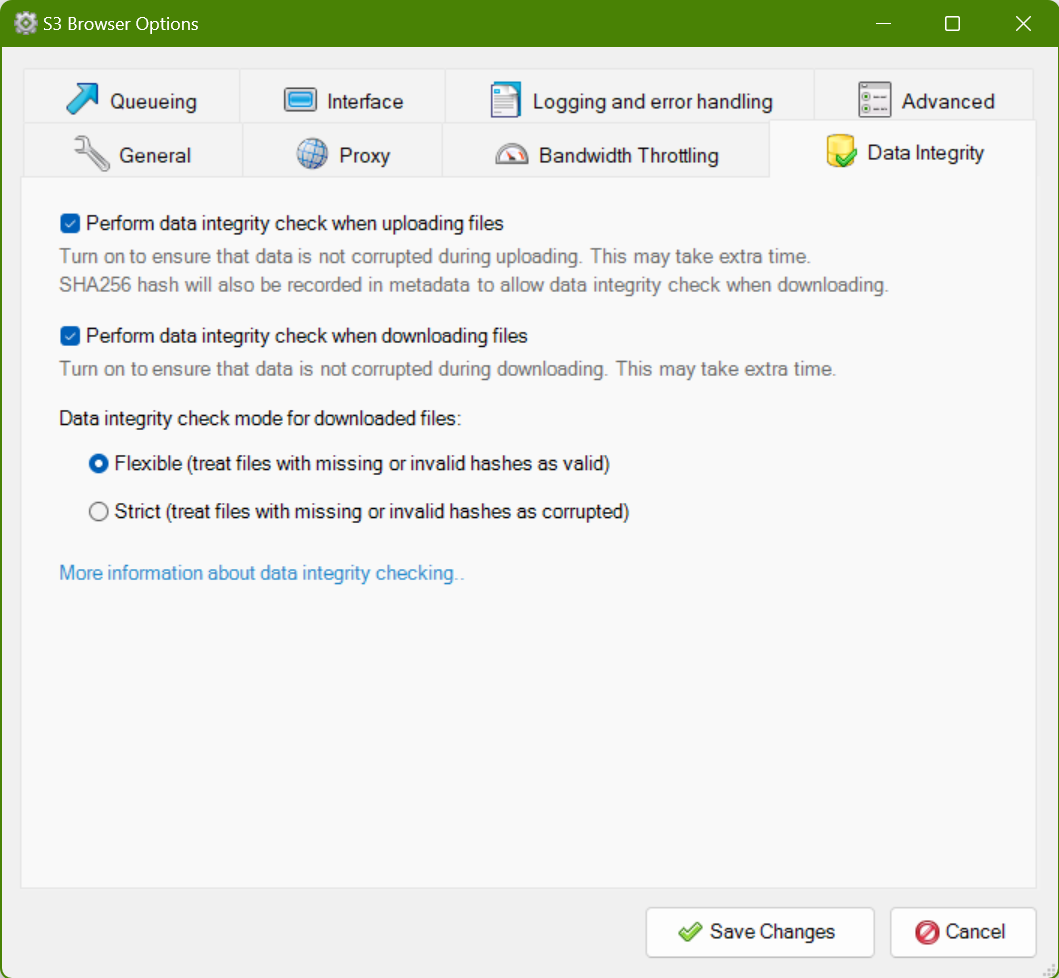
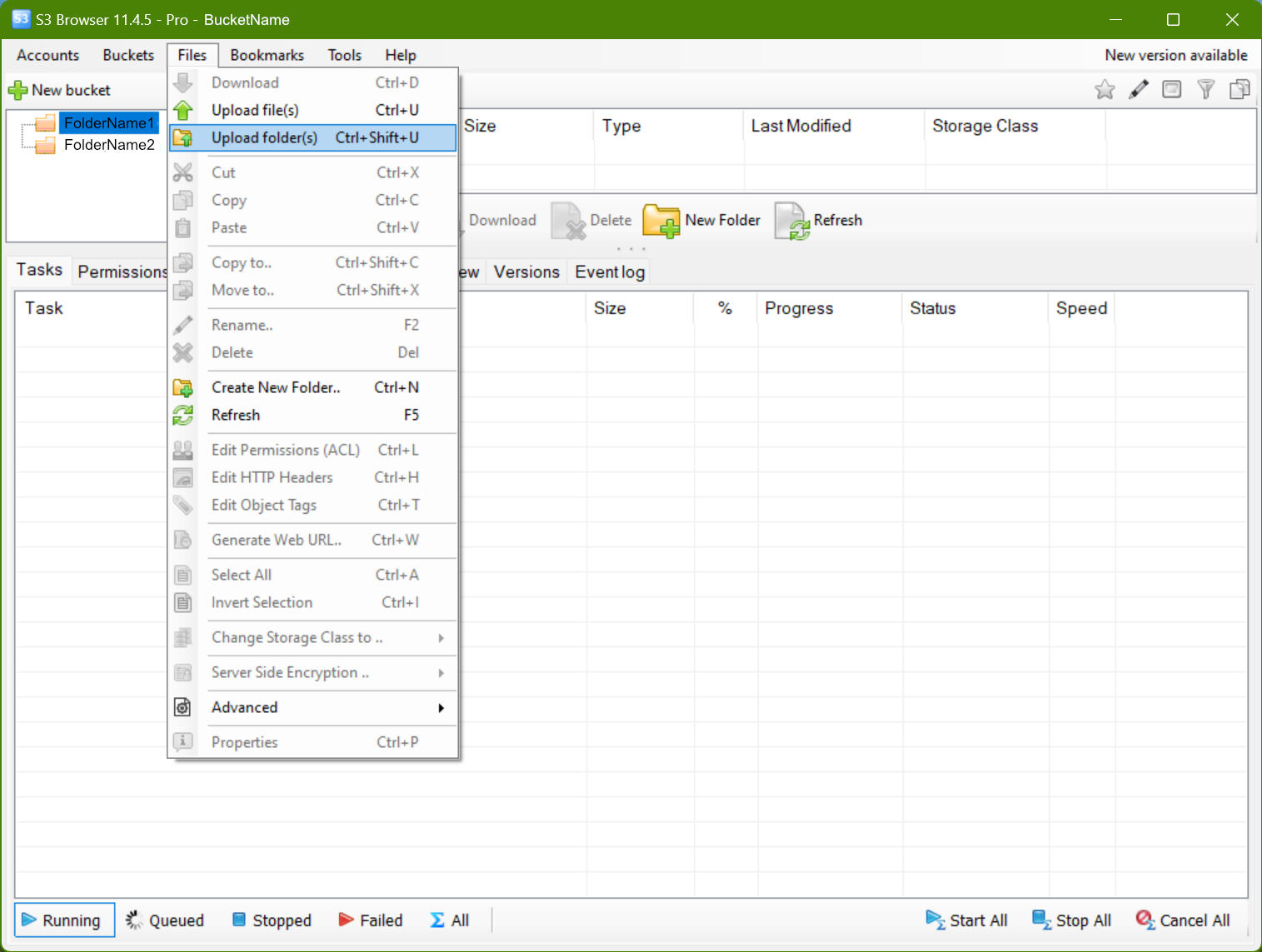
- To enable it, go to Options > Data Integrity and check the relevant boxes.
- Then try an upload: Files > Upload or Ctrl+U.
Finding the SHA-256 hash of your file
- Select a file you have uploaded and open the Headers tab.
- Look for
x-amz-meta-sha256— this contains the SHA-256 hash of the file. It will always be identical for identical file content.
This gives you cryptographic proof that a file downloaded from S3 is byte-for-byte identical to what was originally uploaded. For regulated industries, audit trails, or simply keeping data pipelines honest, that matters.
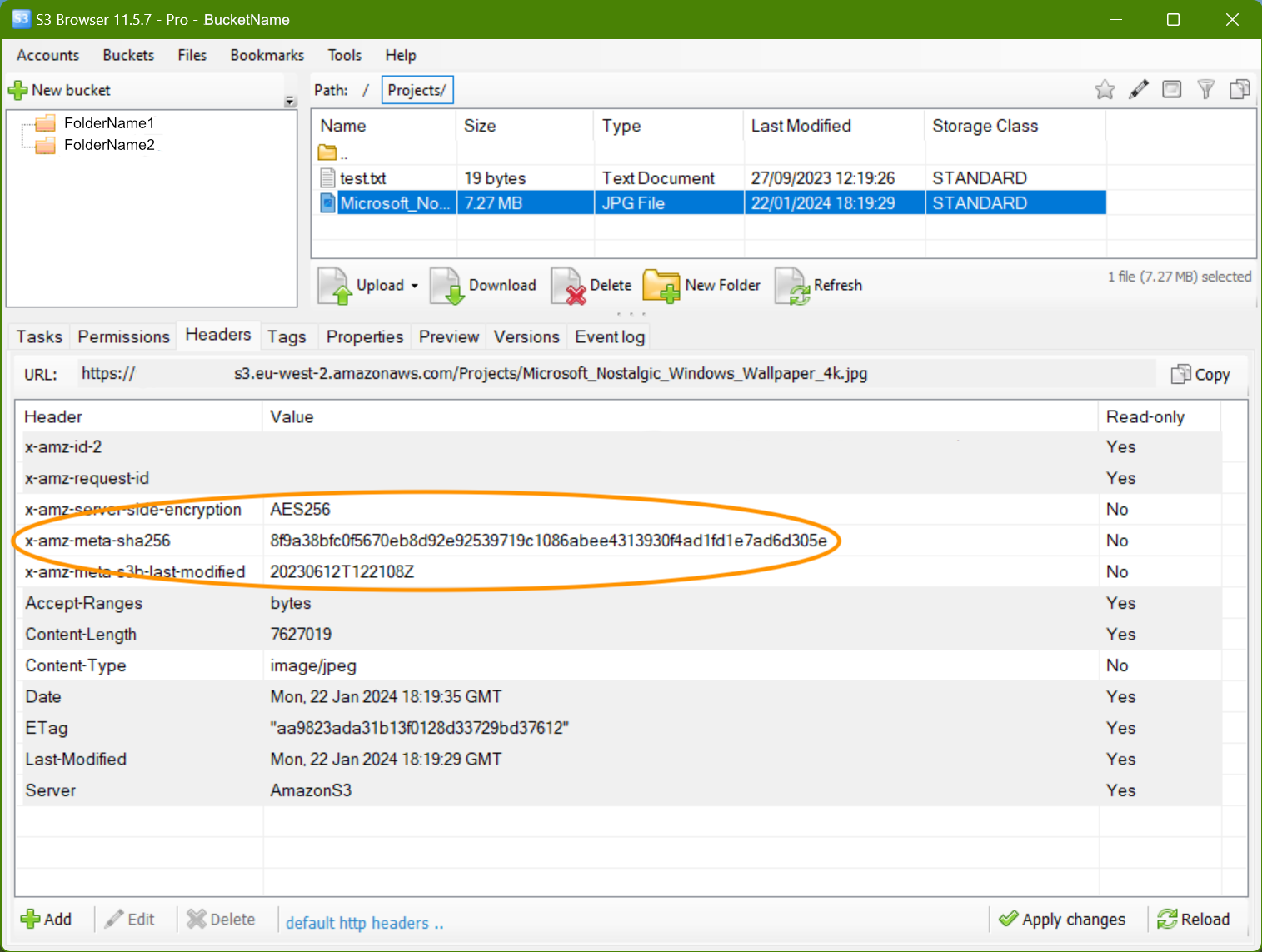
Files uploaded before you enabled data integrity won't carry the x-amz-meta-sha256 header — it only gets written at upload time. Whether that's a problem depends on your workflow, but going forward, keeping this on costs nothing and adds meaningful assurance.
Folder Sync Tool
The Folder Sync Tool has become one of S3 Browser's most capable features for teams managing large or frequently updated datasets. The 13.2.5 release significantly improved analysis performance by introducing parallel processing, which makes a noticeable difference when scanning large buckets before a sync operation. The 13.3.5 release added Sync Exclusion Rules, so you can now define patterns for files or folders to skip entirely — useful for keeping build artefacts, temporary files, or local-only config out of your buckets without having to manage that manually each time.
For teams running automated or scheduled syncs, two new CLI commands — /file list-sync-jobs and /file run-sync-job — make it straightforward to integrate S3 Browser's sync functionality into scripts and pipelines without opening the GUI. Combined with the option to disable the metadata cache file (added in 13.2.5), the Folder Sync Tool is now a credible choice for lightweight automation scenarios that don't warrant a full infrastructure tool.
AWS SSO and credential management
Managing AWS credentials has always been one of the rougher edges of working with S3 tooling. S3 Browser 13.3.5 addresses this directly by adding support for AWS CLI SSO session profiles and AWS SSO token caching. If your organisation uses AWS IAM Identity Center (formerly AWS SSO) to manage access, you can now authenticate through S3 Browser using the same SSO profiles you use in the CLI — no need to generate and rotate static access keys just to use a desktop client. This is a meaningful improvement for security-conscious teams and anyone working in an enterprise environment where long-lived credentials are actively discouraged.
AWS European Sovereign Cloud support
Version 13.3.5 adds support for the AWS European Sovereign Cloud, AWS's dedicated infrastructure designed to meet European data sovereignty requirements. For organisations operating under strict EU data residency obligations — particularly those in financial services, healthcare, or the public sector — this means S3 Browser can now connect to and manage buckets hosted in that environment directly, without workarounds. If your organisation moved workloads to the European Sovereign Cloud since its launch, this update makes S3 Browser a viable desktop client for those buckets.
Web URL Generator
The Web URL Generator has been updated in 13.3.5 with two notable improvements: Signature Version 4 is now used by default (V4 has been the AWS standard for some time, so this aligns S3 Browser with current best practice), and TinyURL API integration has been added for generating shorter, shareable links. If you regularly share pre-signed URLs with colleagues or clients, the shorter format is a minor but welcome quality-of-life improvement.
See also
- Details

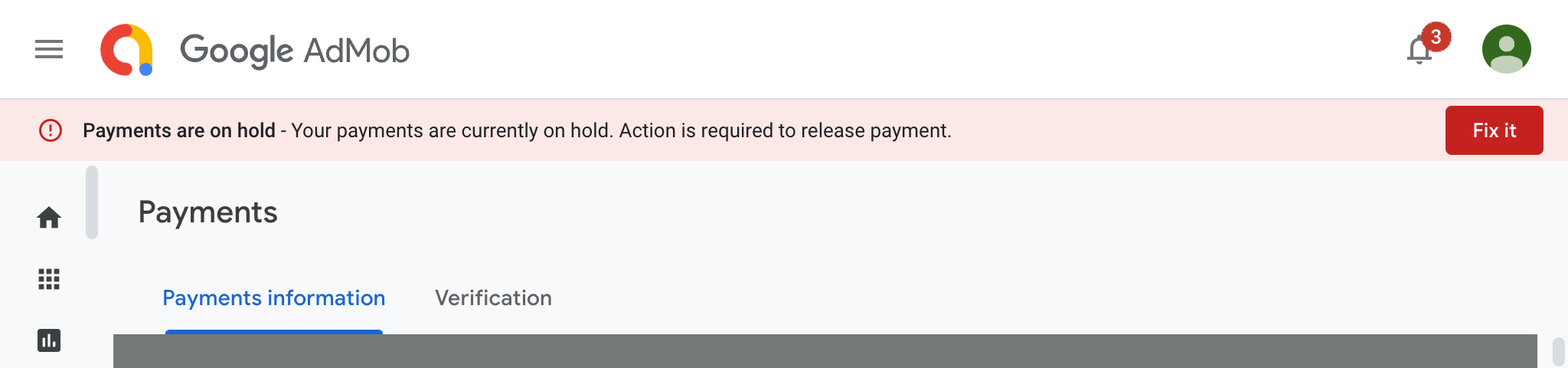
My Google payments for Apps using AdMob were on hold. Thats not good! How do you fix it?
- Details
Read more: Google payments on hold. Action is required - Taiwan

This document is an example security policy for the security of Apple Mac computers running macOS 14 Sonoma in a small business setting.
| Version | Significant changes |
|---|---|
| 1.3 | Updated for macOS 14 Sonoma |
| 1.3.1 | Version for LinkedIn |
| 1.3.2 | Updated with clarifications about supported versions of macOS |
TL:DR – I was asked if I had a security policy document for macOS that would work for a small business who don't have a device management platform and I did have one, but it was mostly in my head or implemented on my Macs, so I decided to write it up in detail.
It is an example. You might want to change things. It is for smaller businesses who can't use Apple Business Manager or similar device management technologies.
I thought it might be helpful to someone to post it here.
- Details
Read more: Hardening Macs - Security policy for macOS Sonoma

iOS 17
iOS 17 brought big updates to Phone, Messages and FaceTime that gave you new ways to express yourself as you communicate. StandBy delivers a new full-screen experience with glanceable information designed to be viewed from a distance when you turn iPhone on its side while charging. AirDrop makes it easier to share and connect with those around you and adds NameDrop for contact sharing. Enhancements to the keyboard make entering text faster and easier than ever before. iOS 17 also includes updates to Widgets, Safari, Music, AirPlay and more.
TL:DR— Install right away if your device is eligible just to get the updates and Security fixes. Consider selling/trading in iPhones older than the iPhone XS as they won't be upgradable to iOS 17 and their value is diminishing. iOS 17 compatible iPhone devices with a lightniing connector are also on borrowed time, but do not need to be immediately replaced. App developers might find it helpful to keep an iPhone 8 or iPhone X around for testing with iOS 16 while it is still supported.
- Details
