
Multizone | All our technotes
If we've published it, you can find it here.

Q: Which Apple MacBook should I buy in 2026?
A: It depends on your budget and workload — but the landscape has genuinely shifted. The surprise hit of the moment is the new MacBook Neo, starting from £599, which has reshuffled the entire lineup. For serious development work or heavy creative tasks, you still want at least 16GB of unified memory — 8GB machines remain a false economy. Read on for the full breakdown.
Apple's Mac lineup in 2026 looks quite different from even eighteen months ago. The headline addition is the MacBook Neo, a new entry-level machine starting at £599 in the UK that slots in below the MacBook Air and has proven to be a genuine smash hit. It brings Apple silicon performance to a price point that was previously unthinkable for a new Mac, and it has forced a rethink of the whole buying decision. The MacBook Air now starts from £1,099, the MacBook Pro from £1,699, and if you need desktop power, the Mac mini starts from £799 and the Mac Studio from £2,099.
The current operating system is macOS Tahoe, which runs beautifully on all current Apple silicon Macs — including the Neo. Every machine in the current lineup is built for Apple Intelligence, Apple's on-device AI layer, so that's no longer a differentiator between models.
Should you buy the MacBook Neo?
The Neo is the machine most people will want to consider first in 2026. At £599 it is the most affordable new Mac laptop Apple has ever sold, and it runs the same Apple silicon architecture as the rest of the lineup. For students, writers, and anyone whose workload sits within everyday productivity — browsing, documents, video calls, light photo editing — it is a compelling choice. The key question, as always, is memory: if the Neo was available in a 16GB configuration with 1TB of storage it would be the one to buy. But it is not. Nevertheless the 8 GB / 512 GB Neo will outlast a cheaply-configured or older refurbished Air by years.
That said, the Neo is not the right tool for everyone. If you are doing software development, video editing, running local AI models, or any sustained heavy workload, the thermal headroom and raw performance of the MacBook Air or MacBook Pro will serve you better. The Air's fanless design still handles most developer tasks without complaint, and the Pro's active cooling means it sustains peak performance indefinitely under load.
The MacBook Air: still the sweet spot for most
The MacBook Air — now starting from £1,099 — remains the pick for anyone who needs a genuinely capable all-rounder without paying Pro prices. It carries a 13.6-inch Liquid Retina display, a 1080p FaceTime HD camera behind the notch, MagSafe 3 charging, two Thunderbolt/USB 4 ports, Touch ID, and a backlit keyboard. The flat, fanless design is elegant and quiet. For the vast majority of users, including most developers, it is more than enough machine.
The core advice has not changed: do not buy 8GB. It will feel constrained within a year and frustrating within two. Prioritise 16GB of unified memory, and if your budget stretches to 512GB of SSD storage, take it — storage is not upgradeable after purchase.
When to step up to the MacBook Pro
The MacBook Pro starts from £1,699 and is the right choice if you are editing high-resolution video, compiling large codebases continuously, working in 3D, or running demanding local AI workloads. The active cooling system is the critical difference: where the Air will throttle under sustained load, the Pro sustains peak performance as long as you need it. The Liquid Retina XDR display is also noticeably better — brighter, with a wider dynamic range — if that matters to your work.
With M4, MacBook Pro is up to 1.8x faster than the 13-inch MacBook Pro with M1 for tasks like editing gigapixel photos, and even more demanding workloads like rendering complex scenes in Blender are up to 3.4x faster.
The Pro lineup spans 14-inch and 16-inch screen sizes, with M4 Pro and M4 Max chip options depending on how much GPU and memory bandwidth your work demands. If you are buying a Pro, it is worth configuring with at least 24GB of unified memory — the base configuration is capable, but more memory pays dividends quickly in professional workflows.
The quick guide
- Tight budget, light use: MacBook Neo from £599 — get 16GB if you can.
- Most people, including developers: MacBook Air from £1,099 — 16GB unified memory, 512GB SSD is the sensible configuration.
- Heavy creative or technical workloads: MacBook Pro from £1,699 — active cooling and sustained performance make the premium worthwhile.
- Desktop power: Mac mini from £799 or Mac Studio from £2,099 if you don't need portability.
Whatever you choose, buy from Apple directly or a reputable retailer, check whether education pricing applies to you (it often saves a meaningful amount), and resist the temptation to underconfigure on memory. The machine you buy today needs to feel fast in 2029.
- Details

Overview of Android Debug Bridge (ADB) and its functionality
Android Debug Bridge, commonly known as ADB, is a command-line tool that provides developers and advanced users with a means to communicate with Android devices. It serves as a versatile interface to execute commands, transfer data, and access hidden system features. Whether you're deploying applications or debugging errors, ADB is an essential tool in the Android ecosystem.
TL:DR – ADB has been around for many years and is a very stable tool with a lot of funcitonality. Screenshots are easy to do and thats just the start.
- Details
Read more: How to Take Screenshots with Android Debug Bridge (ADB)
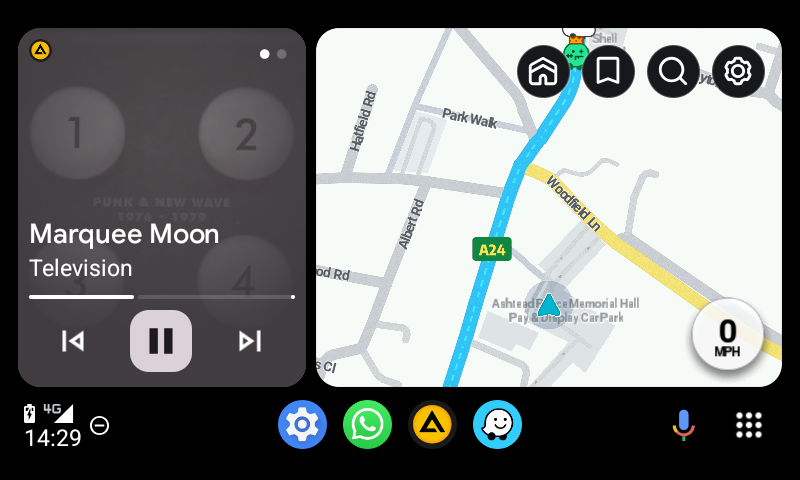
Overview of Android Auto and its functionality
Android Auto connects your smartphone to your car's infotainment system, offering a simplified, distraction-free interface for navigation, communication, and entertainment. By projecting essential apps onto your car's display, it ensures drivers can access what they need without compromising safety.
Why taking screenshots with Android Auto is useful
Capturing screenshots in Android Auto is crucial for developers, testers, and designers. Screenshots help document app interfaces, debug issues, and share designs or workflows with teams. Whether for refining an application or creating tutorials, taking screenshots streamlines many processes.
TL:DR – The taking of a screenshot of the infotainment screen is harder than an ordinary screenshot. To me it is a two person operation because passengers should do this as its too distracting for drivers!
- Details
You can export a copy of content in your Google Account to back it up or use it with a service outside of Google.
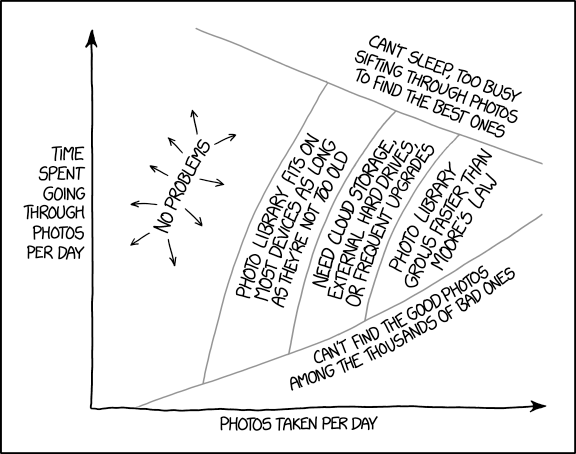
This is quite the arduous task. See the above comic from XKCD for why!
TL:DR – I need to organise my Photo Libraries. First step is to get them all into one place, locally. This is a work in progress
- Details

Boot Camp is gone. Apple silicon Macs — from the M1 through to the latest M4 chips — have no native Windows support, and that's not changing. What has changed is that virtualisation on Apple silicon has matured enormously, and in 2026 running Windows 11 Arm in a virtual machine on your Mac is genuinely fast, stable, and practical for real work. This guide walks you through doing exactly that with VMware Fusion.
TL:DR – Windows 11 (Arm) runs exceptionally well under VMware Fusion on Apple silicon. Setup is straightforward thanks to the built-in "Get Windows" feature, but you'll need a valid licence to activate it.
- Details

Finder lets you discover advanced functionality naturally. But sometimes you need a cheat sheet. Theres always something new to learn.
TL:DR – These are my favourite advanced Finder moves. I'll add to the list as I remember more.
- Details

Weighing up the pros and cons of receiving money anonymously online? Is privacy is worth the trade-offs? What are the hidden risks?
TL:DR – The purpose of this article is to take a balanced look at the pros and cons of receiving money anonymously online. It will explore both the positive aspects, such as enhanced privacy, and the risks, such as fraud and legal complications, providing a clear perspective on what you might gain—and lose—from this practice.
- Details
Read more: Pros and Cons of Receiving Money Anonymously Online
