
Multizone | All our technotes
If we've published it, you can find it here.

This guide shows how to configure Apache installed via Homebrew on macOS to serve PHP files. It covers prerequisites, configuration changes, and simple tests to confirm PHP is working correctly.
Prerequisites
- macOS with Homebrew installed
- Homebrew
httpdservice running - PHP installed via Homebrew (
brew install php) - Basic familiarity editing configuration files
Steps
- Locate your Apache configuration file:
The main config is usually at/opt/homebrew/etc/httpd/httpd.conf. - Include PHP settings:
Add the following line near the bottom ofhttpd.conf:# PHP settings Include /opt/homebrew/etc/httpd/extra/httpd-php.conf - Create or edit
httpd-php.conf:
Add these lines:# PHP LoadModule php_module /opt/homebrew/lib/httpd/modules/libphp.so <IfModule php_module> <FilesMatch \.php$> SetHandler application/x-httpd-php </FilesMatch> <IfModule dir_module> DirectoryIndex index.html index.php </IfModule> </IfModule> - Restart Apache:
Run:brew services restart httpd - Test PHP:
In your Apache document root (e.g./opt/homebrew/var/www), create a file calledinfo.php:
Then visit<?php phpinfo(); ?>http://localhost:8080/info.php(or your configured port).
Verification
If PHP is configured correctly, you’ll see the PHP information page showing version details, loaded modules, and configuration paths.
See Running Homebrew Apache with Let's Encrypt SSL on macOS Tahoe and Running Homebrew MySQL or MariaDB on macOS Tahoe.
Homebrew Logo: Vítor Galvão (creator); MikeMcQuaid, Synoli (committers), BSD, via Wikimedia Commons
- Details

This HOWTO documents the steps to run Apache (httpd) installed via Homebrew on macOS, serving content over HTTPS with Let’s Encrypt SSL certificates. The configuration avoids permission problems and port conflicts by using a neutral certificate directory and high-numbered ports.
Prerequisites
- macOS with Homebrew installed.
- Apache (
httpd) installed with Homebrew:
brew install httpd- A valid Let’s Encrypt certificate for your host (obtained via
certbot).
TL:DR – This is unnecessarily complex to debug really mostly due to Apple's decisions over the years about security and local web servers combined with the need to verify your connection to the computer over the Internet but once you crack it, you'll have a nice local web development environment on macOS that 'just works'.
- Details
Read more: Running Homebrew Apache with Let's Encrypt SSL on macOS

Android 16 brings a range of exciting updates and enhancements to your Android device aimed at boosting mobile productivity and improving your security. From improved security features to personalized options for group chats and smart home management, Android 16 is designed to enhance your mobile productivity and overall user experience. Let's examine the key improvements that Android 16 offers for Android phone users, with a focus on Pixel devices.
TL:DR – Android 16 introduces new security features, personalized group chat options, an enhanced image editor, and more to elevate your mobile experience
- Details
Read more: Key security and personalisation improvements in Android 16

Vintage Sun workstations have never been more relevant to collectors and computing historians than they are right now. As we move through 2026, a generation of engineers who grew up alongside these machines are reaching the point in their careers where nostalgia meets disposable income — and the market has responded accordingly. Having used many of these machines as daily workhorses during their commercial prime, I want to set out why they mattered then, why they matter now, and how the engineering philosophy baked into a SPARCstation IPX connects in a direct line to the silicon and software running on today's Apple Silicon Macs.
TL;DR — The Sun workstation was a remarkable piece of engineering. Sun workstations were the forerunners of modern IP-based networked computing. The engineering remains stellar. The industrial design still looks fresh. And in 2026, they are increasingly hard to find in good condition.
{ToC}
Introduction
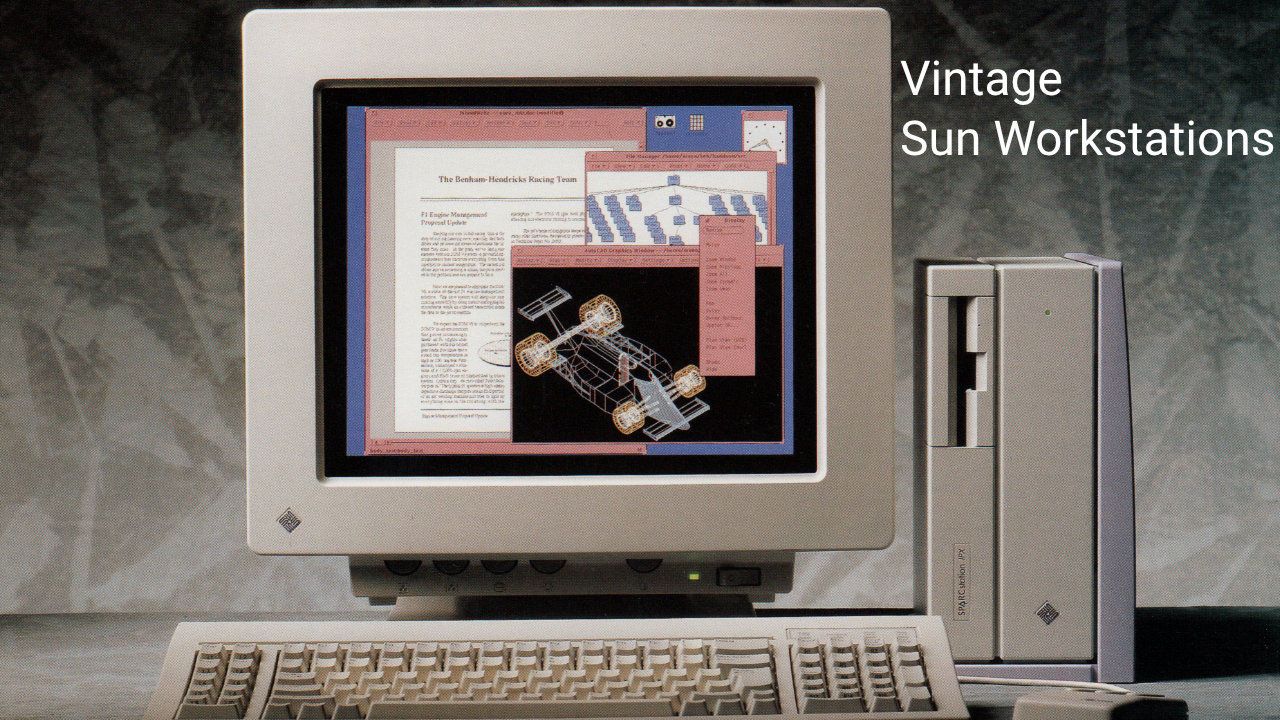
The vintage computer market has matured considerably. Where a decade ago you might find a working SPARCstation IPX at a car boot sale for next to nothing, today these machines command serious attention — and serious prices — on specialist auction platforms and at events like the Vintage Computer Festival. Collectors who once focused purely on Apple or Commodore hardware have broadened their horizons, and Sun workstations have moved firmly into the spotlight.
Sun workstations earned their reputation through powerful Unix-based operating systems, genuinely innovative hardware design, and a networking philosophy that was years ahead of the mainstream. These were not hobbyist machines — they were the tools of scientists, engineers, financial traders, and the researchers who built the early internet. That professional pedigree gives them a different weight in the collector's cabinet compared to a home micro.
In this article, we trace the history of Sun's most important workstations, examine what drives their value in today's market, look at what restoration involves in practice, and explore the community that keeps these machines alive and running in 2026.
History of Vintage Sun Workstations
Understanding why collectors prize these machines so highly requires a grounding in where they came from and what they represented at the time. The history of Sun workstations is, in many ways, the history of networked computing itself.
The Unix Workstation Revolution
In the 1980s and into the 1990s, Unix-based workstations produced by Sun Microsystems fundamentally changed what a desktop computer could be. These were not machines for word processing or spreadsheets — they were designed for technical and scientific work, offering processing power and networking capability that personal computers of the era could not approach. The Sun-1, released in 1982, established the template: a workstation built around open standards, designed from the outset to live on a network.
It was the launch of the SPARCstation 1 (Sun 4/65) in 1989, however, that broke Sun into the mainstream and established the visual and technical language the company would use for years to come.
SPARCstation 1
The iconic pizza-box form factor, designed by frog design, set the house style for Sun's entire subsequent workstation lineup. Sun produced over 120,000 SPARCstation 1 units, and it remained supported until 1995. It is not a particularly rare machine, but finding one in genuinely good condition — with working NVRAM, intact plastics, and a functioning SCSI drive — has become increasingly difficult. This is where the SPARC era truly began: proprietary SBus expansion, reduced instruction set (RISC) processors, and a networking stack that assumed your computer was always connected.
Early machines like the SPARCstation 1 used AUI (thick Ethernet) connections, so connecting one to a modern network requires an external AUI-to-twisted-pair transceiver. This is a small but important detail for anyone attempting a restoration today — these transceivers are themselves becoming collectible and can be harder to source than the workstations themselves.
At the time, most of us at Sun had a 3/60 workstation, which felt pedestrian by comparison. I personally used a Sun 386i — an oddball Intel-based Sun workstation that never sold in great numbers and largely disappeared into internal use. Getting hold of a SPARCstation 1 as an employee was nearly impossible; customer demand consumed the entire production run.
SBus Expansion
SBus cards gave these workstations their versatility. Ethernet, parallel, serial, and SCSI expansion cards were available from Sun and a wide range of third-party manufacturers. SBus was a genuine leap forward compared to the VMEbus used in the first-generation Sun workstations built around Motorola 68000-series processors — the same processor family Apple chose for the original Macintosh line. The parallel development paths of Sun and Apple, both rooted in Motorola silicon, make for a fascinating comparative history that is still being documented by enthusiasts today.
SPARCstation IPX
The Sun SPARCstation IPX, codenamed Hobbes and introduced on 22 July 1991, remains one of the most sought-after machines in the Sun collector community. Its compact lunchbox enclosure, SBus expandability, and broad software compatibility make it an ideal entry point for new collectors — provided you can find one.
The IPX succeeded the SPARCstation IPC and represented a meaningful step forward in performance and integration. When new, it was priced in the range of $12,000 to $13,500 — serious money that reflected its professional workstation positioning. Today, working examples in good cosmetic condition regularly attract strong bids from collectors who appreciate both its engineering and its aesthetics.
- Powered by a 40 MHz Fujitsu MB86903 or Weitek W8701 SPARC processor.
- Four 72-pin SIMM slots supporting up to 64 MB of parity Fast Page Mode (FPM) RAM at 50–80 ns — filling all four slots is a recommended first step in any restoration.
- One internal 50-pin Narrow SCSI drive bay plus a floppy drive; no IDE or ATAPI support, which means modern storage solutions require a SCSI-to-SD adapter or similar bridge device.
- Integrated Sun Turbo GX (cgsix) colour framebuffer on the internal SBus, outputting at the Sun-standard 1152 × 900 @ 66 Hz — a resolution that requires either a period Sun monitor or a sync-on-green to HDMI converter for use with modern displays.
- Onboard AMD Lance Ethernet via an AUI port; an external transceiver is required for twisted-pair Ethernet connectivity.
- Compatible with SunOS 4.1.1 through Solaris 7, and with Linux distributions that supported the SPARC32 sub-architecture — though active Linux SPARC32 support has largely wound down, meaning SunOS or Solaris is the practical OS choice for a restored IPX today.
The SPARCstation IPX stands as a testament to what Sun Microsystems achieved at its peak: a machine that was compact, rugged, elegantly engineered, and genuinely useful. Three decades on, it still draws people in.
One practical challenge that has grown more pressing in recent years is the NVRAM chip. The IPX, like most Sun workstations of this era, uses a Dallas or SGS-Thomson timekeeper chip that contains both the real-time clock and the machine's host ID. These chips have a finite battery life and the vast majority are now dead or dying. A dead NVRAM chip prevents the machine from booting correctly. The good news is that the vintage Sun community has developed well-documented procedures for replacing the internal battery or substituting a compatible modern chip — resources for this are readily available on forums and specialist wikis. It is essentially a mandatory step in any IPX restoration in 2026.
The IBM PC and DOS Era in Context
While Unix workstations dominated technical computing, the IBM PC's open architecture — launched in 1981 — drove a parallel revolution in business and home computing. IBM's decision to build around commodity components and license MS-DOS rather than develop a proprietary ecosystem meant that compatible machines from dozens of manufacturers flooded the market through the 1980s. The IBM PC XT 286 and the PS/2 Model 80 represent two particularly interesting collecting targets from this lineage. I bought an XT 286 as a home computer in the late 1980s: proper clicky keyboard, colour graphics, and an 80286 processor that ran WordStar and Lotus 1-2-3 with authority. The PS/2 Model 80 took the architecture further with a 386 processor and IBM's proprietary Micro Channel Architecture bus — a technically superior but commercially ill-fated design that IBM eventually abandoned under market pressure.
NeXT: The Bridge Between Eras
No account of this period is complete without NeXT. After leaving Apple in 1985, Steve Jobs founded NeXT Computer and produced a series of high-end workstations for the education and research markets. The NeXTcube is the machine on which Tim Berners-Lee developed HTTP and the first web browser — a fact that gives it a historical significance matched by very few objects in computing history. Doom was also developed on NeXT hardware. Like the early Sun workstations, the original NeXTcube was built around a Motorola 68030 processor.
NeXTSTEP, the operating system Jobs built for these machines, was a fusion of the Mach microkernel and BSD Unix, with a user interface built on Display PostScript from Adobe. When Apple acquired NeXT in 1997, NeXTSTEP became the foundation for what is now macOS — making the NeXTcube a direct ancestor of every Mac sold today. The machine to own is the NeXTcube Turbo, which runs a Motorola 68040 and optionally a NeXTdimension 32-bit colour graphics board. These were reportedly supplied in significant numbers to government agencies given their processing advantage at the time, which has only added to their mystique.
NeXT hardware has appreciated sharply in the collector market. Complete, working NeXTcube systems — particularly Turbo configurations with the NeXTdimension board — are now genuinely rare, and prices reflect that scarcity. If you encounter one at a reasonable price, treat it seriously.
Value in the Current Market
Vintage Sun workstations and related Unix hardware occupy a distinct and increasingly confident corner of the collectible technology market. Several forces are converging in 2026 to push values upward: the machines are now old enough to carry genuine historical weight, the pool of working examples shrinks each year as capacitors fail and NVRAM batteries expire, and a new generation of collectors — many of them software engineers who have grown up using Unix-derived systems — are entering the market with both knowledge and motivation.
What Drives Value
Condition remains the dominant factor. A SPARCstation IPX with yellowed, cracked plastics and a dead hard drive is a project; the same machine with original, unrestored cream plastics, a working NVRAM, and a full complement of RAM commands a meaningful premium. Completeness matters too — original Sun keyboards, mice, and monitors are increasingly difficult to find and add disproportionately to a system's appeal. The Sun Type 5 keyboard, in particular, has a devoted following among enthusiasts who regard it as one of the finest keyboards ever made.
Rarity and historical significance play their part. The Sun-2 and Sun-3 series, built on Motorola processors before the SPARC transition, are rarer than the SPARCstation generation and attract collectors interested in the full arc of Sun's history. The SPARCstation 20, at the other end of the SPARC32 timeline, is valued for its multi-processor capability and relatively strong performance — it remains usable as a Solaris workstation in a way that the IPX, with its 40 MHz processor, cannot quite claim.
Comparison with Other Vintage Platforms
Sun hardware competes for collector attention with early Apple Macintosh computers, Commodore Amigas, Atari STs, and SGI workstations. The SGI comparison is particularly apt: like Sun, Silicon Graphics produced Unix workstations aimed at professional markets, and SGI hardware has followed a similar collector trajectory. Both communities face the same core challenges — ageing SCSI drives, dead NVRAM chips, and the difficulty of sourcing period-correct monitors. Apple hardware, particularly the original Macintosh 128K, the Macintosh SE/30, and the Power Macintosh G3, commands strong prices driven partly by Apple's cultural profile and partly by the sheer number of people who remember using these machines. Sun workstations appeal to a somewhat more specialist audience, but that audience is growing.
Restoration in Practice
Restoring a vintage Sun workstation in 2026 is both easier and harder than it was ten years ago. It is easier because the community has produced excellent documentation, open-source firmware tools, and modern hardware adapters that solve problems which once required heroic improvisation. It is harder because the machines are older, the components more degraded, and some parts are simply no longer available at any price.
Where to Start
Begin with a thorough inspection. Remove the cover and look for leaking or bulging capacitors — particularly on the power supply board and the motherboard itself. Electrolytic capacitors in machines of this age have often exceeded their service life, and a recap is frequently necessary before you even attempt to power on. Attempting to boot a machine with failing capacitors risks damaging components that are irreplaceable.
The NVRAM chip is your next priority on any Sun workstation of this era. As noted above, the Dallas-style timekeeper chips used in the IPX and its contemporaries are almost universally dead by now. Replacing the battery or the chip itself is well-documented and not especially difficult with basic soldering skills — but it must be done before the machine will boot reliably. The Sun community maintains detailed guides covering the specific chip variants used in each model.
Storage is the third major hurdle. Original SCSI hard drives from the early 1990s are spinning rust that has now been spinning for over thirty years. Many have already failed; those that haven't are living on borrowed time. The practical solution in 2026 is a SCSI-to-SD or SCSI-to-Compact Flash adapter — several designs are available from small-batch hardware makers in the vintage computing community. These allow you to run the workstation from solid-state storage while preserving the original drive for archival purposes.
Display Compatibility
Connecting a vintage Sun workstation to a modern display is a challenge that deserves its own section. Sun's standard video output for this generation — 1152 × 900 at 66 Hz with sync-on-green — is not natively supported by any modern monitor. You can source a period Sun GDM monitor (increasingly scarce and bulky) or use a sync-on-green to VGA or HDMI converter (several are available from specialist suppliers).
- Details

These deals cover a wide range of categories, from smart home devices to advanced electronics.
To take advantage of these limited-time offers, users should act fast and keep an eye on Amazon's Deal of the Day section. Additionally, Amazon Prime members can enjoy exclusive early access to certain deals and free shipping on eligible items. Watch out though. The prices change often, and don't buy something renewed unless you mean to do so!
TL:DR – Here are some of the top deals from Amazon UK for things we like and use.
- Details
Read more: Amazon UK clearing out limited stock of must have technology

Mac users are constantly seeking ways to optimise their experience and maximise productivity. With the release of the MacBook Air (M4, 2025), Apple introduced several key features that can significantly enhance user workflows and streamline daily tasks. By examining into the technical capabilities of the latest Mac models and understanding how to leverage specific functionalities, you can unlock the full potential of your computer.
TL:DR – Enhance your MacBook Air (M4, 2025) experience with these six expert tips to save time and improve workflow efficiency.
- Details
Read more: Six Things to Learn about the new MacBook Air (M4, 2025)

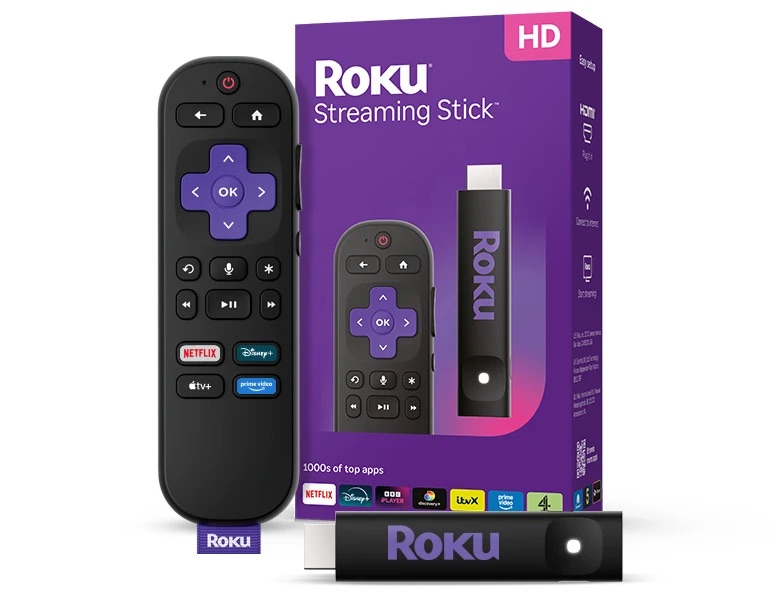
The Roku 3840EU Streaming Stick is a compact, no-fuss streaming device that delivers solid HD picture quality up to 1080p. Part of Roku's 2025 Streaming Stick lineup — the same hardware family as the 3840X released that year — it sits at the affordable end of the range and remains a genuinely practical upgrade for any older TV that still has plenty of life left in it.
TL;DR – The Roku 3840EU Streaming Stick offers snappy menus, a clean and familiar interface, and reliable 1080p picture quality. If you have a perfectly good older TV and simply want to add modern streaming to it without spending a fortune, this is one of the easiest ways to do it in 2026.
{ToC}
The Roku Streaming Stick is over 35 percent smaller than other brands.
Roku in 2026
Roku has been making streaming sticks, boxes, and smart TVs for well over a decade, and the platform has only grown more capable with time. I recently retired a Roku box that had served me faithfully for more than ten years — and the transition to the newer stick format was seamless. The interface is immediately familiar, just noticeably faster. The 3840EU is the European variant of the 3840X, which Roku classifies as a current, fully supported model — meaning it continues to receive OS updates and new channel support rather than being left behind on older firmware.
What's changed most noticeably across Roku's 2025 range is the clear split between HD and 4K tiers. The 3840EU sits firmly in the HD camp: it tops out at 1080p playback and does not support HDR. If your TV is a capable 4K panel, Roku's Streaming Stick 4K or Streaming Stick Plus are the more appropriate choices, both offering Dolby Vision and HDR10+ support. But if your TV is a solid older set that maxes out at 1080p, the 3840EU is the smarter buy — you're not paying for 4K capabilities you can't use.
Fast and Reliable Streaming
Under the hood, the 3840EU runs on an ARM Cortex-A55 processor with 512 MB of RAM — modest on paper, but more than capable for fluid HD streaming and responsive menu navigation. It connects via 802.11b/g/n dual-band Wi-Fi across both 2.4 GHz and 5 GHz bands, which keeps buffering to a minimum on a decent home network.
- HD video over HDMI up to 1080p (1920 × 1080), with upscaling from 720p
- Digital stereo audio over HDMI
- DTS Digital Surround pass-through over HDMI
- Dolby-encoded audio pass-through over HDMI
- USB-C for power
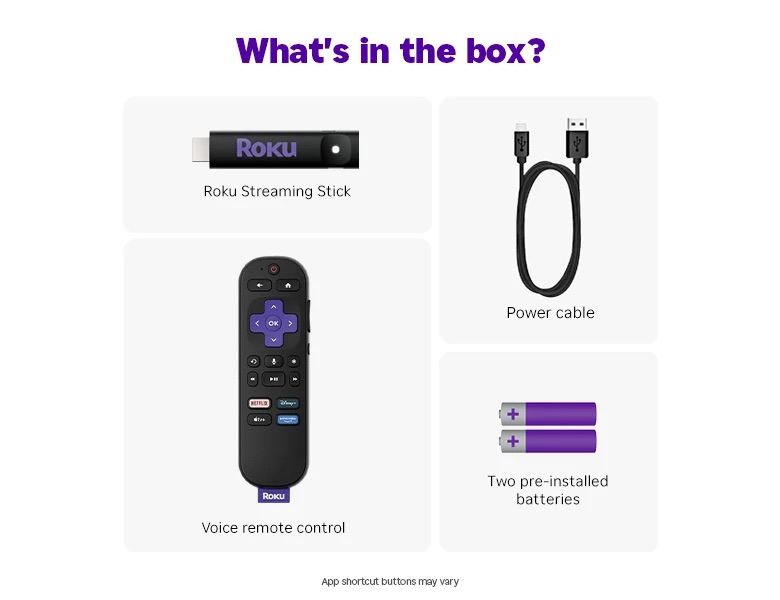
The stick's slim profile is genuinely useful. It plugs directly into your TV's HDMI port and sits flush enough that it won't block adjacent ports — something that chunkier competitors can't always claim. My older Panasonic doesn't have USB power on its HDMI ports, so I used the supplied USB-C to USB-A cable with a standard plug adapter, which worked without any fuss. On newer televisions, the stick can draw power directly from a USB port on the TV itself, removing the need for a separate adapter entirely.
The Remote
The included Roku Voice Remote is straightforward and well thought-out. It paired with my old Panasonic immediately and handles power and volume without needing a separate TV remote. Voice search works reliably for finding content across apps — useful when you can't quite remember which service has the film you're after.
One thing worth noting for anyone upgrading from an older Roku: the built-in headphone jack that appeared on some earlier remotes is gone. Given how widely wireless headphones are used now, it's hard to argue the omission is a real loss, but it's worth knowing if that was a feature you relied on. The remote's battery life has been solid in my experience, and a lost remote finder feature is included for those inevitable moments when it disappears between the sofa cushions.
What's in the Box?
Compatibility and Smart Home Integration
The Roku 3840EU works with Apple AirPlay and Apple Home, Amazon Alexa, and Google Home, so it slots into most existing smart home setups without friction. Casting from an iPhone or iPad via AirPlay is quick and reliable, and Alexa or Google voice commands can control playback if you use either of those ecosystems. It's a broader set of integrations than you'd typically find at this price point.
In the UK, the channel lineup is comprehensive. BBC iPlayer, ITVX, Channel 4, My5, Sky News, Amazon Prime Video, Disney+, Apple TV+, and Netflix all work without issue. Free ad-supported channels through The Roku Channel continue to expand as well, which adds genuine value beyond the subscription services — particularly useful if you want something on in the background without burning through a monthly allowance.
Who Is This For?
The 3840EU makes most sense as an upgrade for an older but functional TV — the kind that still produces a perfectly good picture but was manufactured before smart TV platforms became standard, or whose built-in smart platform has grown slow and poorly supported over the years. Plugging in a current Roku stick effectively gives that TV a modern, actively maintained streaming platform overnight, at a price that's hard to argue with.
If you already own a 4K TV and want to make the most of it, step up to the Roku Streaming Stick 4K instead. But for 1080p sets, the 3840EU is the right tool — quick, compact, and refreshingly simple to set up and live with.
Verdict
The Roku 3840EU Streaming Stick remains a well-executed, no-nonsense device in 2026. It won't win any benchmarks against higher-end streaming hardware, but it doesn't need to. The interface is fast, the picture is clean, the remote is genuinely useful, and the channel selection in the UK covers everything most people watch. For giving a capable older TV a new lease of life, it's one of the more sensible purchases you can make.
In the UK, the 3840EU is available on Amazon. Pick up the Roku 3840EU Streaming Stick on Amazon UK and you'll be streaming within minutes of it arriving.
See also: How to Choose and Connect a Roku Streaming Stick Correctly and Roku® streaming players give a new lease of life to older TV's
- Details

