

Why Joomla Email Delivery Still Matters in 2026
Email remains the backbone of transactional functionality for Joomla websites. Registration confirmations, password resets, payment receipts, and account notifications are not optional features — they are expected, immediate, and in many jurisdictions legally significant. A single misconfigured mail server can halt workflows, frustrate users, and erode trust faster than almost any other technical failure.
Getting email right inside Joomla has never been straightforward, and in 2026 it is harder than ever. Authentication requirements have tightened across the board, Google has closed off legacy access methods entirely, and spam filtering has grown sophisticated enough to silently discard messages that would have sailed through just a few years ago. The days of pointing Joomla at a mail server with a username and password and calling it done are over.
This guide focuses specifically on the Google Workspace path — still the most common setup for small to mid-sized Joomla deployments — and covers what actually works today, what has changed recently, and how to build a setup that will not quietly break on you.
TL:DR – If you use Google Workspace, App Passwords remain a practical and supported route for Joomla's server email, provided two-factor authentication is enabled and you monitor the credential carefully. SMTP relay is the cleaner option if your server has a fixed IP. OAuth 2.0 is Google's preferred direction but Joomla core does not yet support it.
Contents
- Why Joomla Email Delivery Still Matters in 2026
- What Has Changed in 2026
- Transactional Email as Critical Infrastructure
- Why these emails cannot be treated as afterthoughts
- What breaks when server email is misconfigured
- The 2026 Reality: What Google Workspace Actually Supports
- The end of legacy access methods
- What Google fully supports today
- What Google quietly discourages but has not yet blocked
- How Joomla Sends Email Under the Hood
- Joomla's mailer options: PHP Mail, Sendmail, SMTP
- Why SMTP is the baseline, not the advanced option
- Where Joomla's responsibility ends and your server's begins
- Using Google Workspace SMTP with Joomla in 2026
- The endpoint that still works
- Ports and encryption settings that will not get blocked
- Rate limits you need to design around
- App Passwords: Still Viable, Still Requires Care
- When app passwords are allowed
- Setting up an App Password and configuring Joomla
- Workspace admin controls and organisational policy
- Risk profile for production sites
- OAuth 2.0 with Joomla: The Right Direction, Not Yet Straightforward
- Why OAuth is Google's preferred model
- The current state of Joomla and OAuth
- When OAuth is worth the effort
- SMTP Relay: The Cleanest Option for Fixed-IP Servers
- How Google Workspace SMTP relay works
- Plan requirements and limitations
- Authentication layers: IP whitelisting plus SPF
- Why relay scales better than app passwords
- One Mailbox, Multiple Roles: Aliases Done Properly
- What aliases are actually for
- How Google Workspace handles aliases at the SMTP level
- Keeping "From" addresses consistent
- The No-Reply Question: Convenience Versus Deliverability
- When no-reply addresses are appropriate
- Why spam filters have grown sceptical
- A better pattern: monitored inboxes with automated triage
- SPF, DKIM, and DMARC: Non-Negotiable in 2026
- Why "it sends" is no longer a valid test
- Correct SPF for Google Workspace plus your own servers
- DKIM signing and DMARC enforcement
- Deliverability and Reputation Management
- How Google judges your outbound mail
- Warming up domains and IPs after changes
What Has Changed in 2026
Several developments since the mid-2020s have meaningfully shifted the landscape for Joomla email configuration, and it is worth naming them explicitly before diving into the technical detail.
Google completed the removal of "less secure app" access across all Workspace tiers and consumer Gmail accounts. There is no longer any toggle, workaround, or grace period. Any Joomla site still relying on that method stopped working, and the fix requires a proper reconfiguration rather than a setting change.
Google's bulk sender requirements — introduced with significant fanfare in 2024 and now fully enforced — mean that domains sending more than a threshold volume of messages per day must have authenticated SPF, DKIM, and DMARC records in place or face systematic rejection. This is no longer a best-practice recommendation; it is a hard requirement for reliable delivery.
On the Joomla side, Joomla 5.x brought a modernised mail configuration interface and improved SMTP handling, but native OAuth 2.0 support for server mail has not yet landed in core. Third-party extensions fill part of the gap, though none has emerged as a clear community standard. App Passwords therefore remain the most practical credential method for the majority of Joomla deployments using Google Workspace.
Finally, transactional email services — Postmark, Brevo (formerly Sendinblue), Resend, and others — have matured considerably and are now genuinely competitive with Google Workspace SMTP for Joomla use cases, particularly for higher-volume sites. The case for moving transactional mail off Google Workspace entirely is stronger in 2026 than it was even two years ago.
Transactional Email as Critical Infrastructure
Why these emails cannot be treated as afterthoughts
Transactional emails underpin operations in a way that marketing campaigns do not. A user who does not receive a registration confirmation assumes the site is broken. A customer who does not receive a payment receipt raises a dispute. Unlike newsletters, these messages are triggered by user action and expected within seconds. Failure is immediately visible and immediately damaging.
What breaks when server email is misconfigured
Misconfigured email produces a cascade of problems that are disproportionately painful to diagnose. Confirmations go undelivered. Registrations are abandoned. Payment notifications vanish. Spam filters flag the domain, and once reputation decays it takes sustained effort to recover it. Support volume increases sharply, and the root cause — a mail configuration problem — is rarely the first thing investigated.
The 2026 Reality: What Google Workspace Actually Supports
The end of legacy access methods
Google has systematically closed every low-friction authentication path that existed in the early 2020s. "Less secure apps" access is gone. Basic SMTP authentication using only a username and password against smtp.gmail.com without an app password or OAuth token is blocked. Accounts without two-factor authentication cannot generate app passwords. There are no exceptions and no workarounds.
What Google fully supports today
Three paths remain viable for Joomla deployments in 2026:
- App Passwords — a 16-character credential generated for a specific application, available only when two-factor authentication is active on the account. Works with Joomla's built-in SMTP settings without any extensions.
- SMTP Relay — available on most paid Google Workspace plans, authenticates by IP address rather than credentials, and is the cleanest option for servers with a fixed IP.
- OAuth 2.0 — Google's preferred model, token-based, does not expose passwords, but requires third-party Joomla extensions and meaningful configuration effort in Google Cloud Console or Google Workspace admin.
What Google quietly discourages but has not yet blocked
Direct SMTP with an app password is still functional but is not on Google's long-term roadmap as a preferred method. Expect continued pressure toward OAuth over the coming years. Configurations that ignore SPF, DKIM, or DMARC are not blocked at the authentication stage but are increasingly likely to result in delivery failure at the recipient end.
How Joomla Sends Email Under the Hood
Joomla's mailer options: PHP Mail, Sendmail, SMTP
Joomla 5.x retains three mailer options: PHP Mail, Sendmail, and SMTP. PHP Mail is simple to enable but deeply unreliable — it depends entirely on the server's local mail configuration, produces no useful authentication, and is treated with suspicion by modern spam filters. Sendmail is server-dependent, inconsistent across hosting environments, and offers no meaningful advantages. SMTP is the only option that provides authenticated, encrypted, auditable delivery.
Why SMTP is the baseline, not the advanced option
SMTP provides encrypted transmission, proper authentication, and compatibility with Google's security requirements. It integrates cleanly with SPF, DKIM, and DMARC. It produces logs. It fails loudly rather than silently. For Google Workspace specifically, SMTP via smtp.gmail.com with an app password or relay configuration is the documented and supported path.
Where Joomla's responsibility ends and your server's begins
Joomla handles the SMTP credentials and message construction. The server must allow outbound connections on ports 465 or 587, maintain a clean IP reputation, and have correct DNS records. Hosting environments that block outbound SMTP — common on shared hosting — require either a relay arrangement or a transactional email service. This division of responsibility is one of the reasons email debugging is so frustrating: the failure can originate at any layer.
Using Google Workspace SMTP with Joomla in 2026
The endpoint that still works
The primary SMTP endpoint remains smtp.gmail.com. Port 465 with SSL and port 587 with STARTTLS are both supported. Port 587 with STARTTLS is generally recommended for new configurations. Authentication must use an app password — plain username and password authentication is blocked.
Ports and encryption settings that will not get blocked
- Host: smtp.gmail.com
- Port: 587 (STARTTLS) or 465 (SSL)
- Encryption: TLS or SSL — never None
- Authentication: App Password (not your account password)
Rate limits you need to design around
Google enforces per-account daily sending quotas, per-minute throughput limits, and restrictions on recipient counts per message. For most small Joomla sites these limits are not a practical constraint. For sites with significant transactional volume — e-commerce platforms, membership sites, event registrations — the limits become relevant quickly. Extensions that queue and batch outgoing mail help, but high-volume sites should seriously evaluate dedicated transactional email services instead.
App Passwords: Still Viable, Still Requires Care
When app passwords are allowed
App passwords are available only when two-factor authentication is active on the Google account. They can be restricted or disabled by Workspace administrators through organisational unit policies. If your Workspace admin has disabled app passwords at the domain level, this path is not available and you will need to use SMTP relay or an OAuth-capable extension.
Setting up an App Password and configuring Joomla
The recommended approach is to create a dedicated Google Workspace account for outbound Joomla mail — for example,
- Enable two-factor authentication on the dedicated Google account.
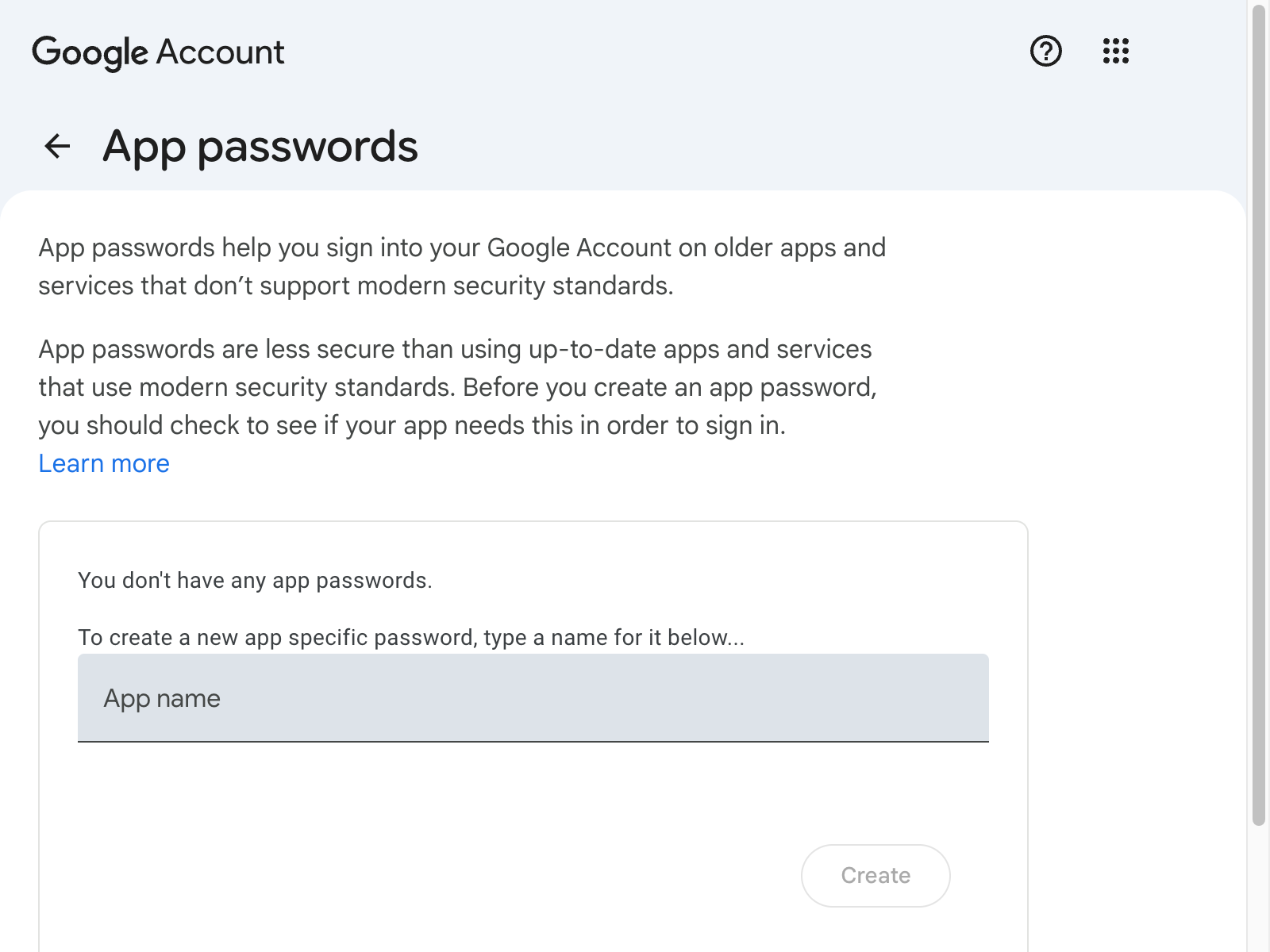
- Navigate to myaccount.google.com/apppasswords while signed in to that account.
- Create a new app password — give it a descriptive name such as "Joomla SMTP" so you can identify it later.
- Copy the generated 16-character password immediately; it will not be shown again.
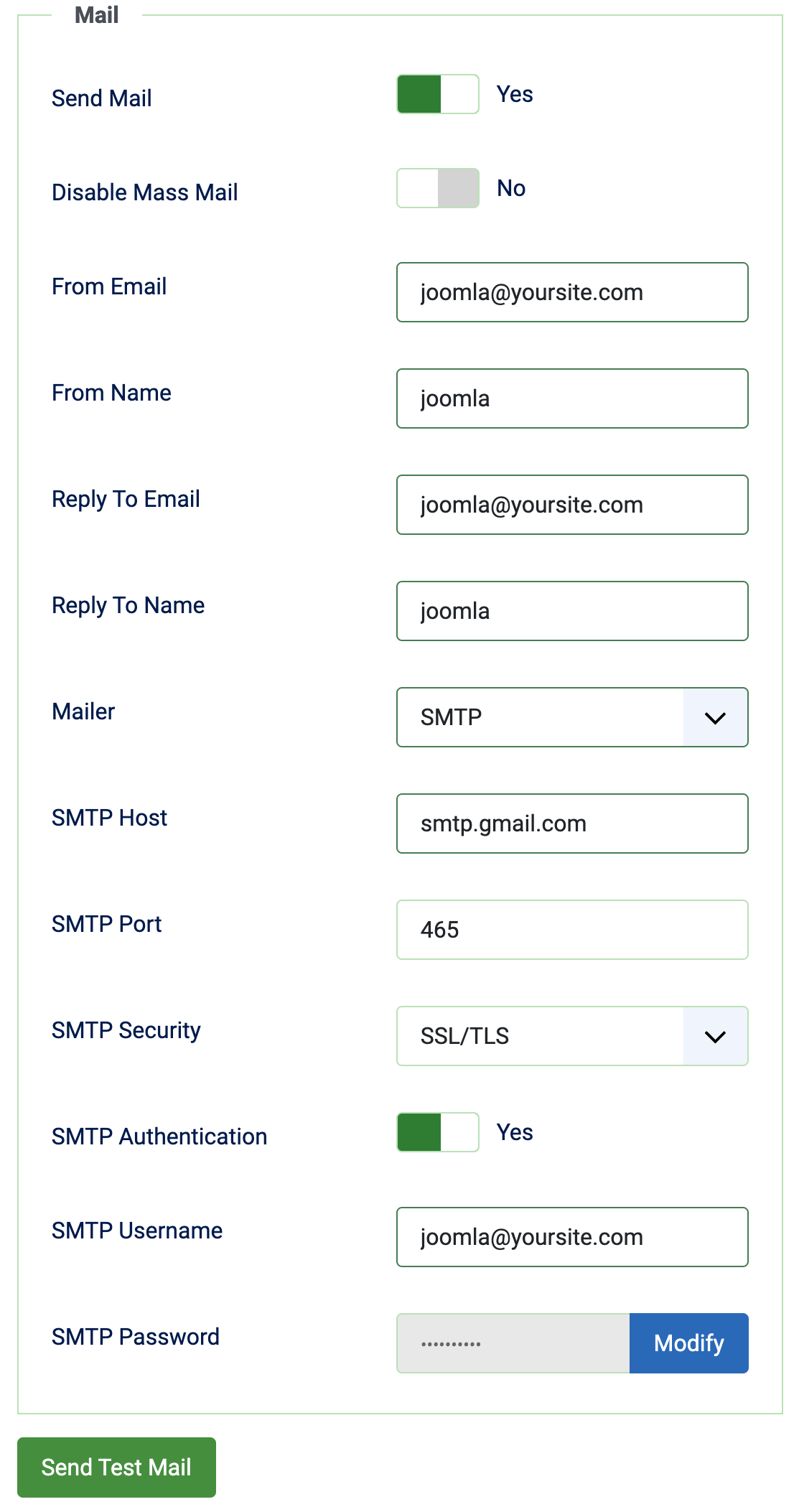
- In Joomla's Global Configuration, set the mailer to SMTP, enter smtp.gmail.com as the host, port 587, TLS encryption, the Google account email address as the username, and the app password (not the account password) in the password field.
- Use the Send Test Email function and verify receipt — check both the Joomla system message and the destination inbox.
- Note that if the Google account password is ever changed, the app password is invalidated and must be regenerated. Build this into your credential rotation process.
Workspace admin controls and organisational policy
Google Workspace admins can control app password availability at the organisational unit level. If you manage the Workspace domain, verify that app passwords are permitted for the account you intend to use before investing time in configuration. If you are a site operator without Workspace admin access, check with your IT team first.
Risk profile for production sites
App passwords bypass two-factor authentication by design — that is their purpose. If the credential is exposed, the account is compromised without requiring the second factor. Mitigate this by using a dedicated low-privilege account, rotating the app password on a schedule, storing it securely (not in a web-accessible file), and monitoring the account for unexpected sending activity.
OAuth 2.0 with Joomla: The Right Direction, Not Yet Straightforward
Why OAuth is Google's preferred model
OAuth 2.0 removes stored passwords from the equation entirely. Authentication uses short-lived tokens that can be scoped, revoked individually, and audited. It is the authentication model Google is actively investing in and the direction all serious integrations are moving.
The current state of Joomla and OAuth
Joomla 5.x core does not include native OAuth 2.0 support for server mail. Third-party extensions exist that add this capability, but they vary considerably in quality, maintenance status, and ease of configuration. Setting up OAuth for Joomla mail requires creating a project in Google Cloud Console, configuring OAuth credentials, and managing token refresh — a meaningful overhead for smaller sites. The Joomla community has discussed adding OAuth to core mail settings, but as of 2026 it has not been delivered.
When OAuth is worth the effort
For organisations with dedicated technical resource, a security posture that demands no stored credentials, or a Workspace environment where app passwords have been disabled by policy, OAuth via a well-maintained extension is the right choice. For the majority of Joomla sites, the complexity-to-benefit ratio still favours app passwords or SMTP relay.
SMTP Relay: The Cleanest Option for Fixed-IP Servers
How Google Workspace SMTP relay works
SMTP relay allows your server to send mail through Google's infrastructure authenticated by IP address rather than credentials. There is no password to store, rotate, or expose. Only traffic from whitelisted IPs is accepted, and messages are sent as your Workspace domain without requiring a specific user account to authenticate.
Plan requirements and limitations
SMTP relay is available on paid Google Workspace plans. It is not available on legacy free Google Apps accounts. Some entry-level Workspace plans may have restrictions — verify your plan's capabilities in the Workspace Admin Console before building around this approach. The original free "Google Apps for your Domain" legacy plans do not support SMTP relay.
Authentication layers: IP whitelisting plus SPF
Configure the relay in the Google Workspace Admin Console under Apps > Google Workspace > Gmail > Routing. Add your server's IP address or range. Combine this with a correctly configured SPF record that includes Google's sending infrastructure. Add DKIM signing and a DMARC policy to complete the authentication stack.
Why relay scales better than app passwords
SMTP relay supports multiple servers sending as the same domain without individual credentials for each. It eliminates the credential rotation problem entirely. For organisations running Joomla across multiple servers or environments, relay is significantly easier to manage at scale.
One Mailbox, Multiple Roles: Aliases Done Properly
What aliases are actually for
Aliases allow a single Google Workspace mailbox to send and receive as multiple addresses. A single system account can handle noreply@, receipts@, support@, and notifications@ without separate accounts, separate credentials, or separate billing seats. This is both cost-efficient and easier to manage.
How Google Workspace handles aliases at the SMTP level
Google allows sending as a verified alias from a single authenticated account. The "From" address in Joomla must match a verified alias on the account — mismatches trigger SPF or DMARC warnings at the recipient end. Configure send-as addresses in the Gmail settings of the account, verify ownership, and then use those addresses consistently in Joomla's mail configuration.
Keeping "From" addresses consistent
Avoid dynamically varying the "From" address in Joomla templates unless every variant is a verified alias on the sending account. Inconsistent sender identity is one of the more common causes of deliverability problems on otherwise correctly configured Joomla sites.
The No-Reply Question: Convenience Versus Deliverability
When no-reply addresses are appropriate
No-reply addresses communicate clearly that a mailbox is unmonitored. For system-generated notifications — automated receipts, log summaries, one-time codes — they are appropriate and expected. The key is that the content genuinely requires no reply.
Why spam filters have grown sceptical
No-reply addresses are associated with bulk sending and, by extension, with spam. Modern filters weight sender engagement — replies, opens, forwards — as reputation signals. A no-reply address generates none of these signals. Overuse reduces deliverability over time.
A better pattern: monitored inboxes with automated triage
Use a monitored inbox with Gmail filters or labels to sort incoming replies automatically. Acknowledgement can be automated. This approach preserves deliverability signals, gives users a genuine reply path, and is not meaningfully more complex to operate.
SPF, DKIM, and DMARC: Non-Negotiable in 2026
Why "it sends" is no longer a valid test
Successful sending from Joomla does not guarantee delivery. Google's bulk sender requirements, now fully enforced, mean that unauthenticated or misaligned messages face systematic rejection or spam classification. The test is not whether Joomla sends the message — it is whether the recipient's mail system accepts and delivers it.
Correct SPF for Google Workspace plus your own servers
Your SPF record must include Google's sending infrastructure (include:_spf.google.com) and any additional IPs your server uses to send mail. Keep the record concise — too many lookups cause SPF evaluation to fail. Validate with a DNS lookup tool after any change.
DKIM signing and DMARC enforcement
Enable DKIM signing in the Google Workspace Admin Console under Apps > Google Workspace > Gmail > Authenticate email. Generate a key for your domain and publish the TXT record in DNS. Once DKIM is active, move your DMARC policy from monitoring (p=none) to enforcement (p=quarantine or p=reject). A monitoring-only DMARC policy provides visibility but no protection and no deliverability benefit.
Deliverability and Reputation Management
How Google judges your outbound mail
Google evaluates SPF and DKIM alignment, IP and domain reputation, content patterns, bounce rates, and user engagement signals. A technically correct configuration can still produce poor deliverability if the sending domain has accumulated complaints or if content patterns resemble spam. Technical correctness is necessary but not sufficient.
Warming up domains and IPs after changes
